
VPLS networks explained

VPLS is a type of virtual private network that securely links multiple sites in a single domain. Could it benefit your business?

Neos Networks | 12 January 2026

Get high-bandwidth Business Ethernet


What is VPLS?

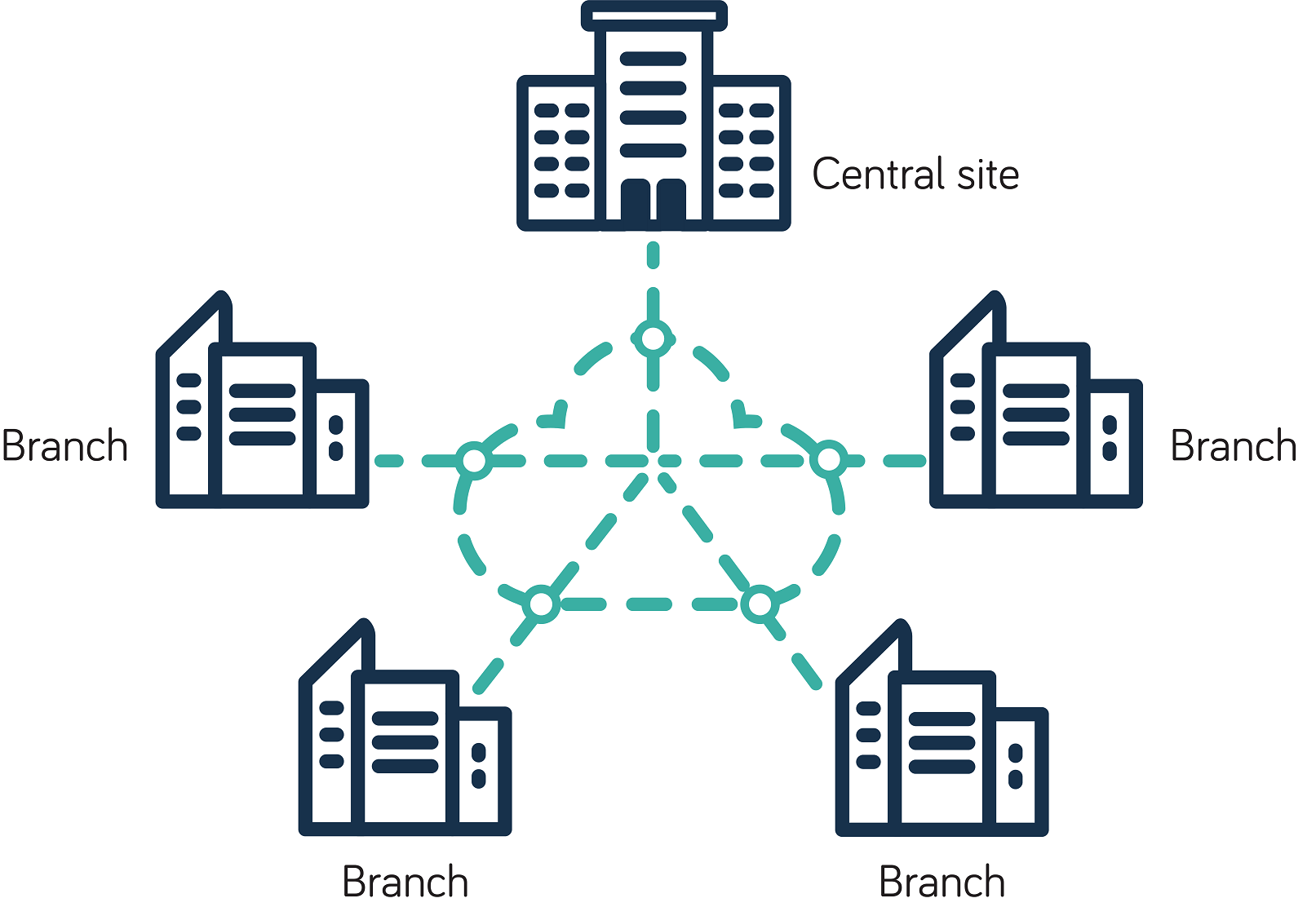
VPLS (Virtual Private LAN Service) is a virtual private network (VPN) that links multiple sites into a single Ethernet-based domain. It connects dispersed local area networks (LANs) into one secure, high-speed wide area network (WAN), so your remote offices act as if they share the same local network.

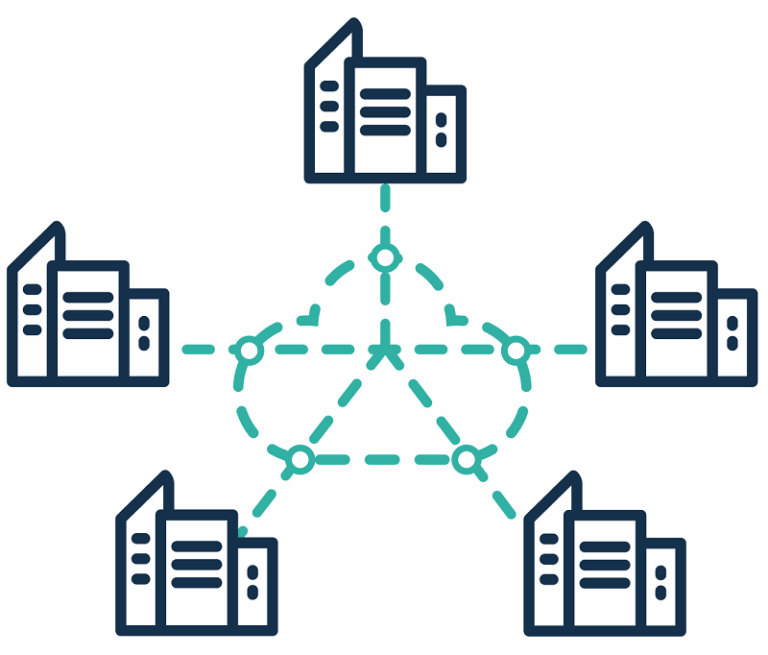
VPLS provides any-to-any connectivity: each site connects directly to every other site. For example, here’s Neos Networks VPLS, which leverages our high capacity, UK-wide core network:

Neos Networks VPLS

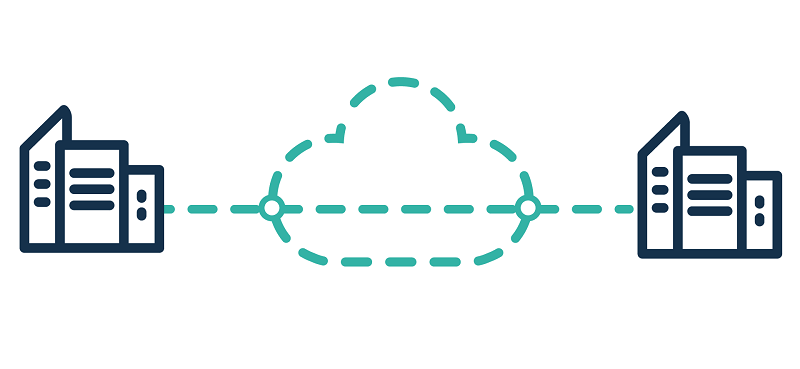
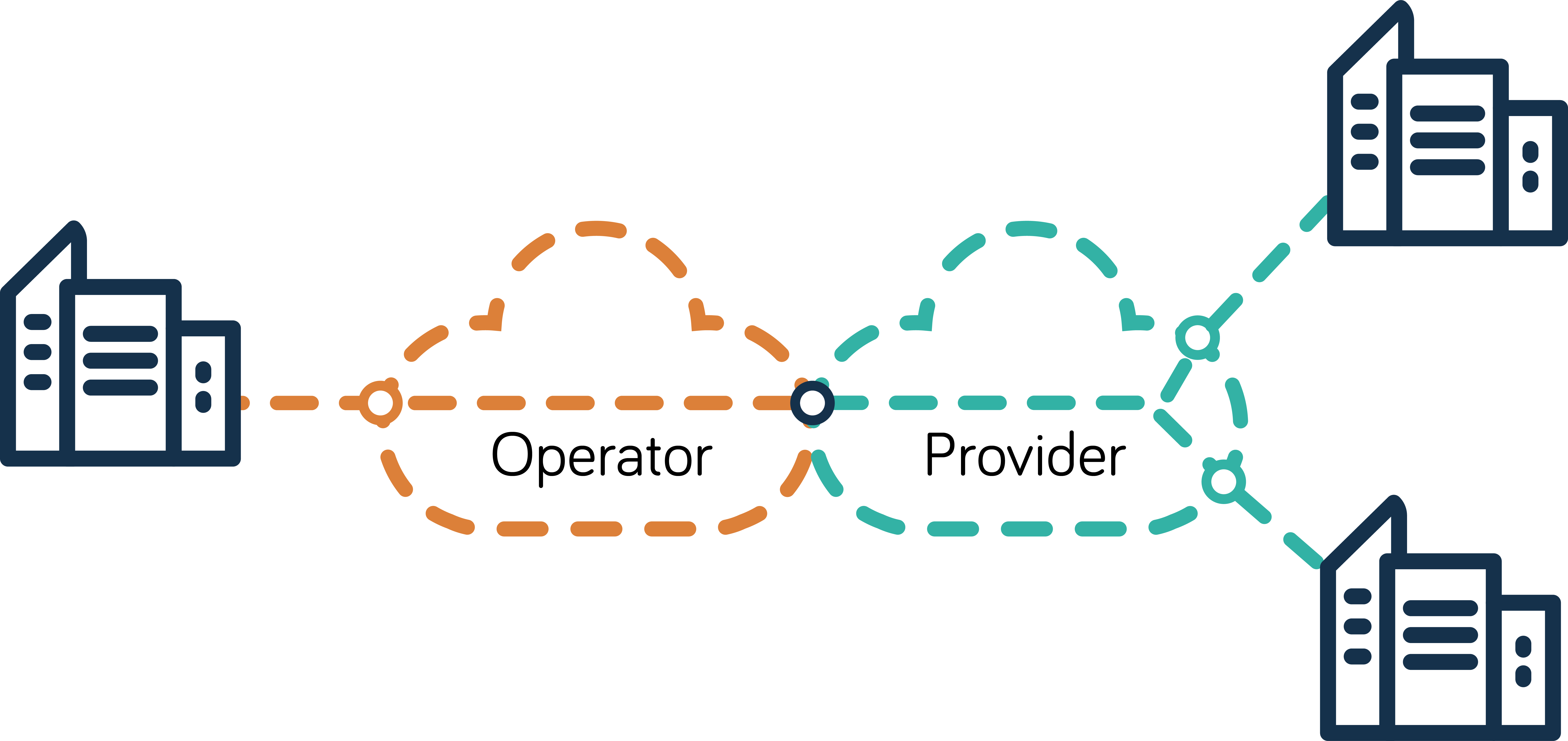
Neos Networks EPL, an Ethernet point-to-point service, showing a dedicated Ethernet link between two customer premises via the Neos Networks backbone and third-party access networks.


How does VPLS work?

VPLS emulates the functionality of a traditional Ethernet LAN, making distant locations behave as if they’re on the same LAN. It typically runs over your provider’s MPLS backbone, which ensures predictable paths and low latency.

The service learns MAC addresses and works like a large virtual switch, forwarding traffic to the correct destination. Every site can talk to every other one on the network without routing through a central hub, reducing latency and improving resilience.

What’s the difference between VPLS and MPLS?

The key difference between VPLS and MPLS is that MPLS is the underlying transport technology, while VPLS is a service built on top of it to extend LAN functionality:

  • MPLS operates between Layer 2 and Layer 3 of the OSI model. It uses labels to route IP packets and supports advanced Quality of Service (QoS) and traffic engineering.
  • VPLS works at Layer 2. It acts like a giant Ethernet switch across all your sites, forwarding traffic to the right destination.

MPLS Layer 3 VPNs typically use point-to-point (P2P) or hub-and-spoke design, and they don’t forward Ethernet broadcast or multicast traffic by default.

By contrast, VPLS uses pseudowires (virtual connections) to create an any-to-any network, forwarding Ethernet traffic like a LAN – ideal for business applications such as voice and video.

In short, MPLS can work well if you need granular IP routing, traffic engineering and advanced QoS across a WAN. VPLS is better if you simply want to extend your Ethernet LAN seamlessly across your sites without moving to a Layer 3 architecture.

But what if you need to combine Ethernet with other connection types?

VPLS vs SD-WAN

Both VPLS and SD-WAN connect multiple sites, but SD-WAN gives you more flexibility:

  • VPLS extends your Ethernet LAN across your sites, typically using MPLS as the transport. It works at Layer 2 and relies on predefined MPLS paths for predictable performance.
  • SD-WAN creates a software-defined overlay at Layer 3 that sits on top of any underlay – MPLS, internet or 4G/5G. It routes traffic dynamically across multiple connection types, giving you centralised control, real-time visibility and direct access to cloud services.

So if you need fast, low latency LAN-like performance for critical applications, VPLS may be right for you. If you need more flexible, hybrid connectivity with easy cloud integration, SD-WAN may be the better choice.

Learn more about SD-WAN

Is VPLS secure for my business?

VPLS is secure because it runs over your provider’s private core network, not the public internet. Customer traffic is logically separated using MPLS labels, so each organisation’s data stays isolated.

VPLS also limits external visibility. Your Layer 2 traffic is carried across the provider’s network, but your internal IP addressing and routing decisions remain within your own network.

However, VPLS doesn’t encrypt traffic by default. If traffic were compromised inside a provider’s core network, the data packets could theoretically be read.

So if you’re in a regulated sector like healthcare, finance or the public sector, you should add encryption. MACsec or IPsec overlays are commonly used to meet compliance and data-protection regulations.

Overall, VPLS provides a secure network for most business use cases. But security ultimately depends on your provider’s infrastructure. Choose a provider you can trust with a resilient, B2B-only backbone and proven track record.

What are the advantages of VPLS?

VPLS offers several benefits if you need to link multiple sites across a wide area network:

  Feature What it means for your business
LAN-like Ethernet connectivity over a WAN Extends your LAN across sites, so remote locations feel as if they’re on one local network.
Any-to-any connectivity Connects every site directly to every other without backhauling traffic.
High performance Delivers reliable, low latency connectivity over a resilient MPLS backbone.
Control Keeps routing and IP addressing within your network, reducing reliance on your provider.
Scalability Makes it easy to add new sites without deploying complex point‑to‑point links.
Simplicity Relies on familiar Ethernet technology, making it easy for your IT team to manage.
Cost Runs over established Ethernet and MPLS infrastructure, often more cost-effective than legacy WAN services.


Common VPLS limitations

VPLS is secure, but it doesn’t have native encryption. If you’re in a highly regulated industry, you may need to add external encryption to meet compliance requirements.
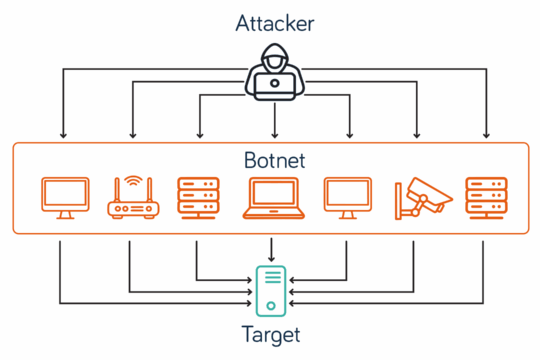
You can easily add new sites to your network using a full mesh of pseudowires – virtual point-to-point connections. But the design can become complex as the number of sites grows.
VPLS also transmits all broadcast (one-to-all), unknown unicast (one-to-one when the destination isn’t known), and multicast (one-to-many) traffic across the entire mesh. In larger deployments, this can use unnecessary bandwidth and increase the risk of traffic flooding.

So VPLS can be a great choice for small or medium-sized networks that need LAN-like performance across multiple sites. It’s less suited to very large, complex or cloud-first network architectures.

VPLS use cases

A VPLS network can be ideal for several enterprise applications, including:

  • Connecting multisite businesses: VPLS links all your offices into one Ethernet domain, so teams share resources as if they’re on the same LAN.
  • Data centre interconnects: It delivers high capacity, low latency connectivity for syncing workloads, storage and backup.
  • Financial services: Low latency and consistent performance support trading platforms and real-time data feeds.
  • Healthcare: Hospitals and clinics can share large imaging files across sites without relying on the public internet.
  • Retail: You can run centralised point-of-sale systems and inventory management across multiple branches with consistent performance.
  • Manufacturing: Factories can connect production systems and IoT devices to headquarters for real-time monitoring and control.

But whatever your sector, your VPLS network will only perform as well as your provider’s underlying infrastructure.

How to choose a VPLS provider

From initial design to long-term growth, you need a provider that can deliver the performance, scale and reliability your organisation depends on. Here are some questions to consider when weighing your options.

Network reach

Can they connect all your sites, including remote locations? Do they offer a choice of access tails?

Performance guarantees

Do they offer SLAs that support your business‑critical applications? Do they spell out the uptime and fix times you can expect?

Resilience and reliability

Do they run a resilient core network with built-in redundancy? Do they offer diverse routing and failover options across your network?

Security options

How is your traffic separated on their infrastructure? Do they support encryption methods like MACsec and IPsec?

Service flexibility

Can you upgrade bandwidth and add sites quickly? Can they integrate with MPLS, SD‑WAN or cloud services as your needs evolve?

Operational support

Do they offer proactive monitoring and fast fault resolution? Do they have 24/7, UK-based customer service and engineering teams?

Commercial transparency

Are the costs clear, with predictable pricing for access, bandwidth and contract changes? Do the contract terms give you the flexibility your organisation needs?

Track record

Do they have experience delivering complex VPLS deployments for businesses like yours? Providers may promise the earth, but can they deliver?

Ultimately, do you trust them to deliver what they promise, when they promise it?

VPLS solutions

If you’re looking for a VPLS provider you can trust to deliver, Neos Networks can help. Enterprise and public sector organisations trust us to connect Critical National Infrastructure across the UK.

To explore our high capacity, low latency Business Ethernet services – including VPLS for multisite connectivity – download our brochure.

Get high-bandwidth Business Ethernet

Not sure whether VPLS, SD-WAN or another service is right for your organisation? Get in touch. We’ll help you build a future-ready network you can scale as you grow.

VPLS: FAQs

You might also like

  • Article

What is Ethernet?

  • Ethernet
  • Article

What is point-to-point Ethernet?

  • Ethernet

EPL vs EVPL networks

EPL and EVPL both provide a secure, high capacity Ethernet connection between your sites. Which is right for your business?

Neos Networks | 24 December 2025

Get high-bandwidth Business Ethernet

What is Ethernet Private Line (EPL)?

Ethernet Private Line (EPL) is a point-to-point (P2P) connection between two locations. It provides high capacity, low latency connectivity with guaranteed bandwidth. And because it’s a dedicated line for your business, it’s inherently secure.

For example, Neos Networks EPL connects your sites using a pair of dedicated User Network Interfaces (UNIs) and our high capacity fibre network.

Neos Networks EPL: point-to-point Ethernet

Neos Networks EPL, an Ethernet point-to-point service, showing a dedicated Ethernet link between two customer premises via the Neos Networks backbone and third-party access networks.


What are the benefits of EPL?

EPL gives you guaranteed performance for critical site-to-site connectivity, including:

  • A dedicated connection: private P2P connectivity between two locations
  • Scalability: high capacity scalable from 10Mbps to 10Gbps+
  • Security: the connection doesn’t cross the internet, so it’s inherently secure
  • Reliability: no traffic congestion from other users ensures consistent performance
  • Low latency: no other users contend for bandwidth, so latency remains stable

In short, EPL is a high capacity P2P connection that’s ideal for mission-critical links between two sites.

EPL use cases

EPL’s reliable, P2P connectivity is ideal for critical business operations, such as:

  • Linking headquarters to branch offices for video, voice and real-time data exchange
  • Connecting data centres for data replication, backup and disaster recovery
  • High-bandwidth, latency-sensitive applications in sectors like finance and the media
  • Secure data transfer for regulated sectors like healthcare, finance and government
  • Connecting directly to major cloud service providers to ensure performance and security

What is Ethernet Virtual Private Line (EVPL)?

Like EPL, Ethernet Virtual Private Line (EVPL) offers a dedicated connection that doesn’t cross the public internet. However, EVPL supports multiple Ethernet Virtual Connections (EVCs) on a single UNI, so you can create point-to-multipoint (P2MP) links.

For example, Neos Networks EVPL allows you to securely connect a central hub to several other premises via our high capacity network.

Neos Networks EVPL: point-to-multipoint Ethernet

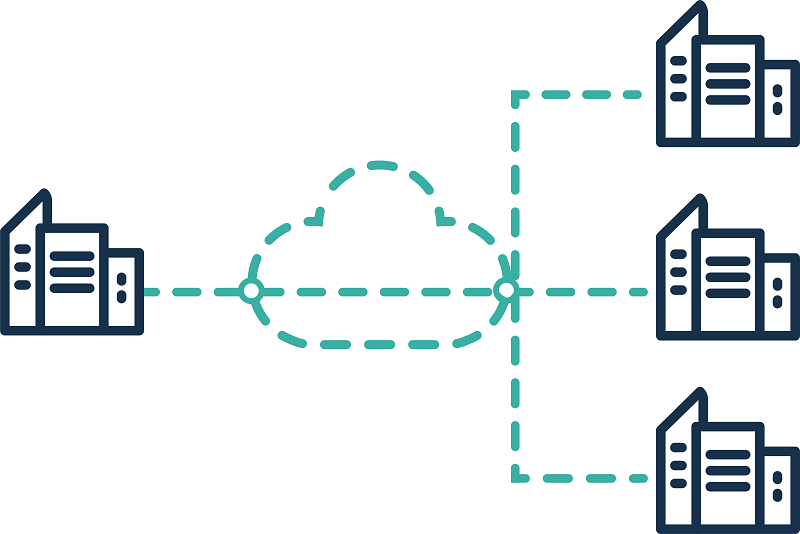
Neos Networks EVPL, showing a dedicated Ethernet link between one customer hub and multiple customer premises via the Neos Networks backbone and third-party access networks


What are the benefits of EVPL?

EVPL gives you a secure, high capacity connection like EPL, but with added flexibility. P2MP functionality means you can add sites as your business grows. It’s a cost-effective way to link several locations to a central hub – a “hub-and-spoke” model – without installing multiple dedicated lines.

EVPL use cases

EVPL can work well for organisations that need secure, scalable connectivity across multiple sites. Typical scenarios include:

  • Linking a head office to several regional branches
  • Running real-time services such as voice, video and collaboration tools across locations
  • Giving multiple sites direct, high-speed access to cloud platforms
  • Expanding your network easily without installing separate dedicated circuits

EPL vs EVPL networks

Both EPL and EVPL give you secure, high capacity connectivity you can scale up to 10Gbps or more. They combine the simplicity of private connections with the flexibility and scalability of MPLS technology.

The key difference is that EPL is point-to-point (P2P), while EVPL is point-to-multipoint (P2MP). Here’s a summary of how they differ:

EPL EVPL
Topology P2P – connects two sites directly P2MP – connects a central hub to multiple branches (hub and spoke)
EVC/UNI configuration One Ethernet Virtual Connection (EVC) per physical port (UNI) Multiple EVCs can share a single UNI
Scalability Limited: each new site needs a new dedicated line High: easily add new sites via virtual circuits without new physical lines
Bandwidth Typically up to 10Gbps+ on a dedicated line Up to 10Gbps+ on a dedicated line but shared across multiple virtual circuits
Performance Fully dedicated path for consistent performance and the lowest latency Shared bandwidth across EVCs: performance can vary slightly depending on traffic allocation
Cost Higher for networks with many branches as each one needs a dedicated line More cost-effective for multisite networks as it uses virtual circuits


EPL vs EVPL: which is right for your business?

If you need a simple, secure link between two sites with guaranteed bandwidth and the lowest latency, EPL could be a good choice. Choose EVPL if you want a more cost-effective solution for multiple locations – a hub-and-spoke network you can scale easily.

EPL and EVPL are both E-Line Ethernet services, as defined by the Mplify Alliance. There are various other Business Ethernet options, such as VPLS (E-LAN) for any-to-any connections or NNI (E-Access), a high capacity connection to external networks.

At Neos Networks, we offer a range of high capacity, low latency Ethernet services across our UK-wide network. If you’d like to discuss which Ethernet service is best for your organisation, get in touch. Or download the brochure to find out more.

Get high-bandwidth Business Ethernet

EPL vs EVPL: FAQs

  • What is the core difference between EPL and EVPL?

    EPL connects two sites with a dedicated point-to-point (P2P) link. EVPL can be P2P, but it also supports service multiplexing. This enables point-to-multipoint (P2MP) connectivity, so you can link one site to several others in a hub-and-spoke network.

  • What is service multiplexing in EVPL?

    Service multiplexing lets you run multiple Ethernet Virtual Connections (EVCs) over a single physical port (UNI) using VLAN tags to separate traffic. This means you can connect several sites or services without installing extra circuits, giving you greater flexibility and cost efficiency.

  • Which is more cost-effective, EPL or EVPL?

    EVPL is usually more cost-effective if you need to connect three or more sites. It uses service multiplexing with VLAN tags to run multiple virtual circuits over a single physical port, so you avoid installing dedicated lines for each location.

  • Are EPL and EVPL both secure?

    Yes, both EPL and EVPL are secure because they don’t cross the public internet, reducing exposure to cyber threats. EPL is slightly more isolated because it provides a dedicated physical path, while EVPL uses logical separation via VLAN tagging on a single physical port.

  • Are EPL and EVPL both scalable?

    Yes, you can easily scale bandwidth for both services from 10Mbps to 10Gbps or more. For network growth, EVPL offers greater flexibility because you can add multiple sites without installing new physical circuits.

  • Can EPL and EVPL support cloud connectivity?

    Yes, both services can connect directly to major cloud providers for secure, high-performance access. EPL is ideal if you need a dedicated, low-latency link to cloud services for a single location. EVPL works well when multiple sites need direct cloud access through a hub-and-spoke design.

  • How does EPL and EVPL differ from SD-WAN?

    EPL and EVPL are both private Ethernet services that give you dedicated, high capacity connectivity. In contrast, SD-WAN creates a software-defined overlay that routes traffic dynamically across multiple connection types, including MPLS, internet and 4G/5G, giving you flexibility, visibility and centralised control.

You might also like

  • Article

What is Ethernet?

  • Ethernet
  • Article

What is point-to-point Ethernet?

  • Ethernet
  • Article

What is 10 Gigabit Ethernet (10GbE)?

  • Ethernet

What is SD-WAN (Software-Defined Wide Area Network)?

Learn what SD-WAN is, how it works and why it’s transforming connectivity for cloud-first businesses. Is it right for your organisation?

Neos Networks | 23 December 2025

Connect your multisite business for the future with SD-WAN

What is SD-WAN?

SD-WAN (Software-Defined Wide Area Network) is a networking technology that uses software to bring together your sites, cloud platforms and remote users in one secure wide area network (WAN).

With centralised management and real-time visibility, you have full control over how your network performs. Designed to support cloud-first strategies and digital transformation, SD-WAN is ideal for multisite organisations that need secure, high-performance connectivity.

SD-WAN vs traditional WANs

Traditional WANs rely on fixed routing and centralised traffic paths, often over MPLS or IP-VPN.

MPLS

MPLS (Multiprotocol Label Switching) is a common underlay in traditional enterprise WANs. Providing reliable, low latency connectivity with high QoS (quality of service), it’s ideal for real-time applications like voice or video. But MPLS can be expensive and slow to scale across multiple sites.

IP-VPN

IP-VPNs use MPLS to create private, secure connections between sites in traditional WANs. While suitable for businesses with strict security and business needs, IP-VPNs rely on fixed routing, which can limit performance and scalability.

In contrast, SD-WAN allows you to integrate MPLS with other connection types, like internet and LTE/5G, giving you more flexibility and cost efficiency.

Traditional WANs typically backhaul all traffic through a central data centre, creating a potential bottleneck. SD-WAN takes a different approach, using dynamic path selection to route traffic over the best available link, enhancing resilience and user experience.

How does SD-WAN work?

SD-WAN applies Software-Defined Networking (SDN) principles to your wide area network. It creates a virtual overlay across all your connections – MPLS, internet and LTE/5G – enabling intelligent traffic steering instead of static routing.

It continuously monitors network conditions like latency, jitter, packet loss and bandwidth. Using this data, SD-WAN routes traffic dynamically along the best-performing path based on real-time performance and business intent.

Management is centralised through a single dashboard, so you can define and enforce traffic policies across all sites. This ensures business-critical applications like voice, video and SaaS tools are prioritised.

SD-WAN also enables direct access to cloud services at each site, reducing delay and improving efficiency. Security features such as encryption and firewalls are built in and can be extended with SASE for cloud-based protection across your network.

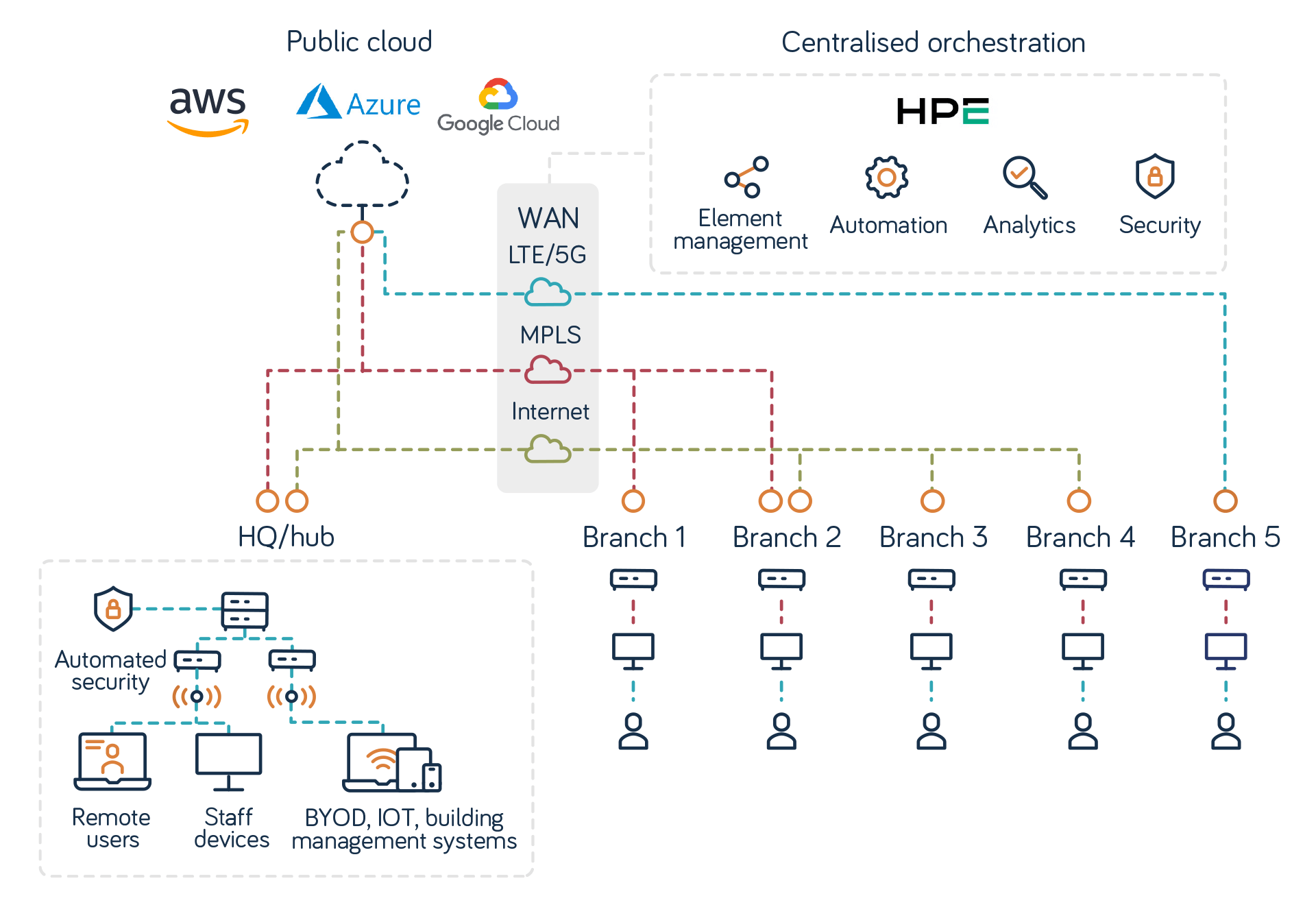
For example, Neos Networks SD-WAN is powered by the next-generation HPE Aruba Networking EdgeConnect platform, enabling centralised orchestration, direct cloud access and automated security.

Neos Networks SD-WAN

Neos Networks SD-WAN: how SD-WAN works showing links to HQ and branches, automated security, centralised orchestration and cloud services.


What are the benefits of SD-WAN?

SD-WAN delivers a range of benefits that go beyond connectivity:

Benefit What it means for your business
Centralised control Manage all sites, users and traffic policies through a single dashboard.
Flexibility and scalability Adapt and grow your network easily, using multiple connection types across all locations.
Real-time visibility Monitor network performance and respond instantly when needed.
Dynamic traffic steering Route traffic over the best path based on live conditions and business needs.
Application prioritisation Prioritise business-critical apps like voice, video and SaaS for peak performance.
Cloud performance Connect sites directly to cloud platforms for faster, more reliable access.
Resilience and uptime Keep teams connected with automatic failover and path conditioning.
Automated security Enforce security policies across your network, with optional SASE integration.
Cost efficiency Route traffic over the most cost-effective connection without compromising quality.


Who is SD-WAN for?

SD-WAN is ideal if you need secure, high-performance connectivity across multiple sites, cloud platforms and remote users. It’s a smart choice if you want to:

  • Modernise your organisation’s legacy WAN
  • Roll out cloud-first or SaaS strategies
  • Support a distributed or mobile workforce
  • Simplify network management and security

It’s especially useful for sectors where uptime, visibility and cloud performance are critical, such as:

  • Enterprise and multisite organisations: Manage complex networks with centralised control and consistent performance.
  • Financial services: Support trading, payments and data-heavy operations with resilient, secure connectivity.
  • Public sector: Deliver scalable, secure networks aligned with the UK government's Cloud First strategy.
  • Transport and logistics: Connect offices, stations and depots while supporting mobile teams and remote access.
  • Energy and utilities: Interconnect critical infrastructure and distributed operations with full visibility and control.
  • Healthcare: Enable secure access to cloud-based records, applications and remote diagnostics across multiple locations.

How does SD-WAN support SaaS and cloud services?

SD-WAN improves SaaS and cloud performance by enabling direct, secure access at each site without backhauling traffic through a central data centre. It’s built for cloud-first strategies, with centralised orchestration and policy control across all sites and users. Here’s how it helps.

Local breakout to cloud services

Sites connect directly to platforms like Microsoft Azure, AWS and Google Cloud, reducing latency and improving user experience.

Avoid backhaul bottlenecks

Routing traffic locally avoids the delays and costs of traditional WAN configurations.

Optimise SaaS performance

SD-WAN allows you to prioritise business-critical apps like Microsoft 365, Salesforce and Zoom, so users get a consistent experience.

Steer traffic dynamically

Real-time monitoring of latency, jitter and packet loss lets SD-WAN route traffic down the best-performing path.

Secure cloud access

Integrated security and optional SASE support protect users and data as they access cloud services from any location.

So is SD-WAN as secure as traditional, MPLS-based WANs?

How secure is SD-WAN?

SD-WAN can be more secure than MPLS if it’s implemented correctly. MPLS uses dedicated connections and is private by design, but it lacks native encryption and relies on separate security layers.

Modern SD-WANs build security into the network architecture:

  • Encrypted VPN tunnels (IPsec or SSL) protect data over public networks.
  • Next-generation firewalls protect against unauthorised access.
  • Zero-trust segmentation limits movement across your network.
  • Real-time detection and analytics help identify and respond to threats fast.
  • Centralised management enforces policies consistently across all locations and users.

Unlike MPLS, SD-WAN often uses the public internet, so it can present a wider potential attack surface if misconfigured. However, that risk is mitigated by implementing SD-WAN with SASE.

With encryption, firewalls and other protections combined with SASE, SD-WAN is typically more secure than MPLS alone, especially for modern, cloud-first networks.

How does SD-WAN integrate with SASE?

SD-WAN is the foundation of SASE. It provides the connectivity and traffic optimisation while SASE delivers network-wide security.

SD-WAN connects sites, cloud platforms and remote users. SASE layers on security functions like secure web gateway (SWG), zero-trust network access (ZTNA) and cloud access security broker (CASB), which helps protect SaaS and other cloud services.

Together, SD-WAN and SASE ensure security policies apply across all your locations, remote users and cloud apps without complex on-premises hardware. This integration gives you a single, unified framework for secure, reliable connectivity across your entire WAN.

How to choose an SD-WAN provider

Start by understanding your organisation’s needs. Ask yourself:

  • How many sites and remote users do you need to connect?
  • What weaknesses in your current network do you need to fix?
  • Where do you plan to scale and how quickly?
  • How important is direct access to cloud and SaaS platforms?
  • Which applications are business-critical?
  • What level of security and compliance do you require?
  • What SASE integration do you need?

Then look for a provider that offers performance, security and flexibility without adding complexity or cost. Here are some key features to look for in a service:

Network reach Can they connect all your sites, including remote or hard-to-reach locations, with diverse access options?
Scalability and flexibility Support for multiple underlay types and the ability to grow with your business
Performance and reliability Features like dynamic path control, tunnel bonding and automatic failover to keep critical apps running
Centralised control A single dashboard for real-time visibility, easy policy management and reporting
Cloud and SaaS optimisation Direct cloud access and prioritisation for tools like Microsoft 365, Zoom and Salesforce
Integrated security Edge-to-edge encryption and seamless SASE integration for consistent protection
Ease of deployment Zero-touch provisioning and automated updates to simplify rollouts
SLAs and support Clear SLAs and 24/7 expert support for guaranteed performance.


Above all, choose a provider with a proven track record of delivery.

Why Neos Networks for SD-WAN?

If you’re considering SD-WAN for your organisation, we can help. As a UK Critical National Infrastructure (CNI) provider with nationwide reach, we tick all the boxes above and more.

With Neos Networks SD-WAN you get:

  • UK-wide, B2B-only network: Built for CNI, forming the backbone of your WAN.
  • Flexible connectivity options: Combine Ethernet, Optical, internet and LTE/5G underlays with cloud and SaaS platforms.
  • End-to-end management: From circuit design to device management and optimisation, delivered and operated by Neos.
  • SASE integration: Works with leading providers like Zscaler, Netskope and Palo Alto Networks for cloud-based security.
  • Exceptional service: 24/7 UK-based Network Operations Centre support, dedicated account management and industry-leading NPS.
  • Trusted expertise: Over 20 years’ experience connecting UK business-critical networks.

Ready to explore SD-WAN? Get in touch. Our pre-sales team will be happy to design an SD-WAN that meets your business goals.

Connect your multisite business for the future with SD-WAN

You might also like

  • Article

What is Ethernet?

  • Ethernet
  • Article

What is enterprise WAN?

  • WAN
  • Article

What is Ethernet WAN (Wide Area Network)

  • Ethernet

What is Ethernet?

Learn how Ethernet connects everything from small business LANs to carrier-grade regional networks. Is it right for your business?

Neos Networks | 8 December 2025

Get high-bandwidth Business Ethernet

What is Ethernet?

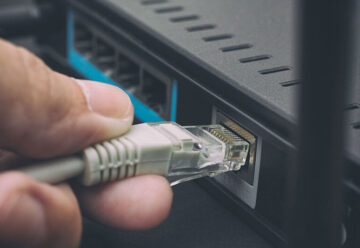
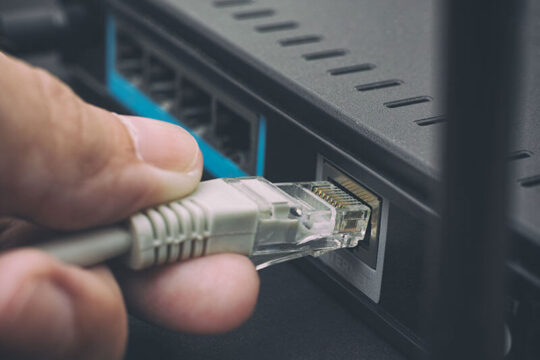
Ethernet is a wired networking technology that connects devices to local area networks (LANs) for fast, reliable data transfer. It works over copper or fibre cables to deliver high capacity, low latency connectivity. For example, if you plug your laptop into a router at home or work, you’re using Ethernet.

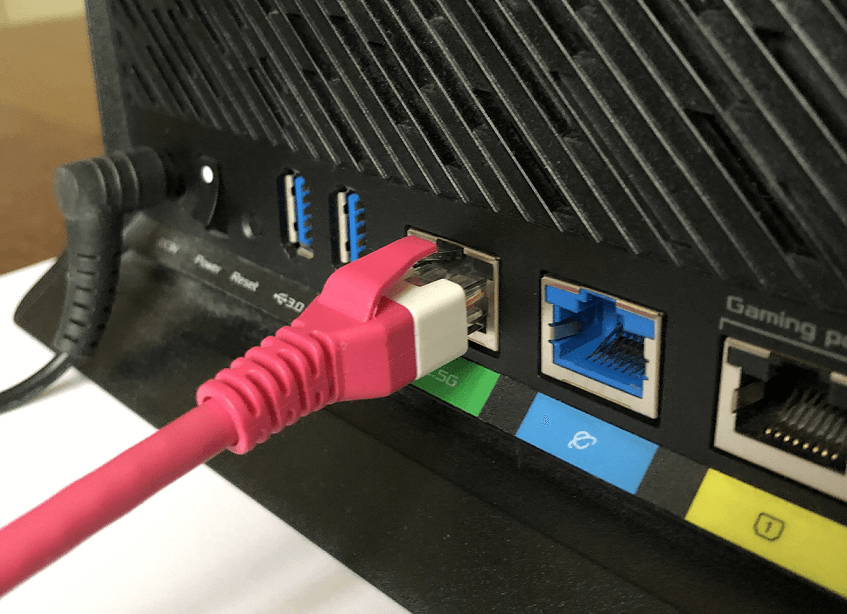
Ethernet cable plugged into a home router

An Ethernet cable plugged into a home router


Because it’s wired, Ethernet typically offers higher speeds, lower latency and greater security than Wi-Fi (WLAN).

How has Ethernet evolved?

Ethernet was invented in the 1970s and first standardised in 1983 with a speed of 10Mbps. Since then, it’s evolved into Carrier Ethernet, delivering up to 100Gbps or more over long distances.

Today, you’ll find Ethernet everywhere. From home LANs to large enterprise wide area networks (WANs) and metropolitan area networks (MANs), it forms the backbone of many wired networks worldwide.

How does Ethernet work?

Ethernet divides data into small chunks called frames, which are transmitted over standardised cables. Ethernet works primarily at the data link layer (Layer 2) of the OSI model, with some elements operating at the physical layer (Layer 1).

The seven layers of the OSI Model

# Layer Function
7 Application layer Enables humans or software to interact with the network through applications like file sharing, email clients and databases
6 Presentation layer Formats, encrypts and decrypts data for the application layer
5 Session layer Starts, maintains and ends connections between applications
4 Transport layer Transfers data across the network, for example, using TCP or UDP transport protocols
3 Network layer Enables communication between multiple networks and determines the data’s path, for example, applying IP addresses
2 Data link layer Manages connections between physically connected nodes on a network
1 Physical layer Transmits raw data bits over physical media like cables or wireless connections


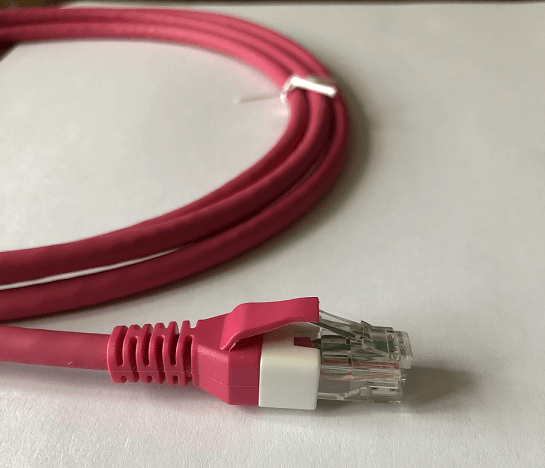
At the physical layer, Ethernet typically uses twisted-pair copper or fibre optic cables to connect devices. For example, below is a twisted-pair Ethernet cable with a standard RJ45 connector.

Ethernet cable and RJ45 connector

A Cat5e twisted-pair Ethernet cable with a standard RJ45 connector


At the data link layer, Ethernet defines the protocols used to transmit data between connected devices as follows.

MAC addresses

Ethernet uses 48-bit Medium Access Code (MAC) addresses. MAC addresses uniquely identify devices on the network.

Ethernet frames

To transmit data, Ethernet packages data into frames containing the source and destination MAC addresses, error-checking data and other standard information. Only devices on the network with the matching destination MAC address will process the frame.

Collision handling

In traditional Ethernet, if two devices transmit data simultaneously, a collision occurs. To prevent this, devices “listen” to the network to see if it’s free. They use CSMA/CD (Carrier Sense Multiple Access with Collision Detection) – an algorithm that allows frames to be retransmitted without collisions.

Today, modern Ethernet networks use switches to forward frames to MAC addresses on the network, reducing collisions and enhancing performance.

In addition, full-duplex mode allows devices to send and receive data simultaneously, doubling the network bandwidth. The total available bandwidth of an Ethernet network depends on the standard used.

Ethernet standards

Ethernet was first standardised in 1983 as IEEE 802.3. At that time, it used thick coaxial cables to transmit data at just 10Mbps over a few hundred metres. All devices shared one channel on a single cable.

Today, Ethernet uses twisted pair or fibre optic cables with switches to forward data efficiently. Here are some key milestones in the evolution of Ethernet standards:

  • Original Ethernet (10BASE): 10Mbps (early 1980s)
  • Fast Ethernet (100BASE): 100Mbps (mid-1990s)
  • Gigabit Ethernet (1000BASE): 1Gbps (late 1990s)
  • 10 Gigabit Ethernet (10GBASE): 10Gbps (early 2000s)
  • 40/100 Gigabit Ethernet (40GBASE/100GBASE): 40Gbps and 100Gbps (2010)

Common Ethernet standards

(Note: Multimode fibre optic cables divide optical wavelengths into multiple paths for different channels; single-mode fibre cables feature a single path for longer distances.)

Ethernet standard IEEE specification Max speed Max distance Common name
10BASE5 802.3 10Mbps 500m (coaxial) Thicknet
10BASE2 802.3a 10Mbps 185m (coaxial) Thinnet
10BASE-T 802.3i 10Mbps 100m (twisted pair) 10 Megabit Ethernet
100BASE-TX 802.3u 100Mbps 100m (twisted pair) Fast Ethernet
100BASE-FX 802.3u 100Mbps 2km (fibre optic, multimode) Fast Ethernet
1000BASE-T 802.3ab 1Gbps 100m (twisted pair) Gigabit Ethernet
1000BASE-SX 802.3z 1Gbps 550m (fibre optic, multimode) Gigabit Ethernet
1000BASE-LX 802.3z 1Gbps 5km (fibre optic, single-mode) Gigabit Ethernet
10GBASE-T 802.3an 10Gbps 100m (twisted pair) 10 Gigabit Ethernet
10GBASE-SR 802.3ae 10Gbps 300m (fibre optic, multimode) 10 Gigabit Ethernet
10GBASE-LR 802.3ae 10Gbps 10km (fibre optic, single-mode) 10 Gigabit Ethernet
40GBASE-T 802.3bq 40Gbps 30m (twisted pair) 40 Gigabit Ethernet
40GBASE-SR4 802.3ba 40Gbps 150m (fibre optic, multimode) 40 Gigabit Ethernet
40GBASE-LR4 802.3ba 40Gbps 10km (fibre optic, single-mode) 40 Gigabit Ethernet
100GBASE-SR10 802.3bj 100Gbps 100m (fibre optic, multimode) 100 Gigabit Ethernet
100GBASE-LR4 802.3bj 100Gbps 10km (fibre optic, single-mode) 100 Gigabit Ethernet


The latest Ethernet standards support speeds up to 400Gbps (IEEE 802.3bs), and 800Gbps and 1 Terabit Ethernet are currently under development.

Most Ethernet-enabled devices are backwards compatible, but your network will only run at the speed of its slowest component.

Get high-bandwidth Business Ethernet

Ethernet components

Ethernet relies on standardised components that work together to enable data transfer. Here are some of the key elements of an Ethernet network:

  • Network interface cards (NICs): Also known as network adapters, NICs are built into devices like servers, computers and printers and allow them to “talk” to an Ethernet network.
  • Ethernet cables: Cables connect devices to the network. Twisted-pair Category 5e (Cat5e) and Category 6 (Cat6) cables are commonly used for Gigabit Ethernet; fibre optic cables are used for longer distances.
  • Ethernet ports and RJ45 connectors: Ports are the physical sockets on devices that Ethernet cables plug into using a standard RJ45 connector (see image above).
  • Switches: Switches connect multiple devices to a network and direct traffic to the right device, reducing data collisions and improving network efficiency.
  • Hubs: A legacy component, hubs connect multiple devices to a network but broadcast data to all the devices, so they’re less efficient than switches.
  • Routers: Links your LAN to other networks or the network, assigning IP addresses and managing traffic.

As components are standardised, Ethernet networks are often “plug-and-play” with little or no setup required – one of several advantages of Ethernet connectivity.

Why use Ethernet connectivity?

Ethernet is widely used in business networks because it’s fast, reliable and easy to scale. Here are the main benefits of Ethernet.

Speed

Business Ethernet services typically provide low latency and high-speed data transmission up to 100Gbps+ with symmetrical upload/download speeds. That’s ideal for large file transfers and real-time tasks like video conferencing, cloud applications or other mission-critical networks.

Cost

Ethernet components are widely available, relatively cheap, and easy to install. So you get high capacity connectivity at a relatively low cost.

Scalability

It’s easy to scale up Ethernet bandwidth as your network grows. And you can usually add devices by cables and switches with minimal setup.

Reliability

Ethernet is a dedicated, wired connection that is less susceptible to interference or disruption than wireless connections. In addition, business Ethernet services typically offer SLAs that guarantee network uptime.

Resilience

Ethernet offers resilience and diversity options to keep you connected if part of the network fails. Options include RO2, dual-homing and shadow VLANs, which provide added protection for mission-critical services.

Learn more about Ethernet resilience

Security

Compared to wireless LANs (WLAN), Ethernet networks are less vulnerable to unauthorised access. Physical ports are easier to secure than Wi-Fi access points.

Interoperability

Ethernet is a global standard, so almost all computers, printers and network storage devices support it. That means easy compatibility across vendors.

So Ethernet is fast, reliable and easy to scale, but it costs more than a simple business broadband connection. How do they differ?

Business Ethernet vs business broadband

Ethernet is fundamentally a Layer 2 technology that connects devices or sites over a dedicated, leased line. It can link a single business site or multiple sites and also provide internet access: it’s the foundation for Dedicated Internet Access.

In contrast, business broadband is a Layer 3 service. It’s simply an IP-based internet connection delivered over shared, mass-market infrastructure.

Here’s how business Ethernet and business broadband compare:

Feature Business Ethernet (leased line) Business broadband
Connection type Dedicated, point-to-point, point-to-multipoint or any-to-any link exclusively for your business site(s) Internet connection shared with other users in the area
Bandwidth Guaranteed, uncontended bandwidth Bandwidth varies depending on local network traffic
Speed Symmetrical upload/download speeds up to 100Gbps Asymmetrical speeds, typically up to 1Gbps
Reliability High reliability with enterprise uptime SLAs Lower reliability, “best effort” service
Scalability Easy to upgrade as your organisation grows Limited by local network capacity
Latency Consistently low Can fluctuate depending on network load
Installation Longer install times – engineer build required Quick install over existing broadband infrastructure
Cost Higher monthly cost as it’s a dedicated service Lower cost


Ethernet over FTTP/FTTC

If you want some of the benefits of Ethernet but at a lower bandwidth and cost, you can connect your business with Ethernet over FTTP or FTTC (EoFTTx).

FTTP (Fibre to the Premises) uses pure fibre from the exchange to your site for higher speeds. FTTC (Fibre to the Cabinet) combines fibre to your local street cabinet with copper to your premises for a lower-cost option.

Neos Networks EoFTTx offers bandwidths from 80Mbps to 1Gbps – ideal for smaller organisations that need reliable connectivity at a lower price. For larger organisations, our EoFTTX NNI enables you to take an NNI at your chosen data centre and run any Ethernet services over it.

Learn more about EoFTTx

Business Ethernet use cases

Given Ethernet’s speed, reliability and wide availability, it’s commonly used by organisations that need consistent, high capacity connectivity for critical operations.

Typical use cases include:

  • Multisite networking: secure links between offices (WANs), data centres (DCIs) and remote locations.
  • Video conferencing and collaboration: enabling smooth, real-time communication without delays.
  • Cloud and SaaS: providing dependable access to hosted applications and services.
  • E-commerce and ERP systems: maintaining accurate, up-to-date data for transactions and inventory.
  • Data-heavy workloads: supporting AI, IoT and analytics that demand high capacity.
  • Real-time operations: enabling financial trading, media streaming and healthcare systems.

Ethernet services can be as simple as a point-to-point connection or as flexible as an any-to-any network, depending on your use case. Let’s look at the main service types.

Types of business Ethernet services

Various Carrier Ethernet services provide high-bandwidth data transmission for enterprise applications. Below are the main types of Carrier Ethernet services, as defined by Mplify:

Carrier Ethernet services

Service type Topology Description
E-Line (Ethernet Line Service) Point-to-point or point-to-multipoint Directly connects two business sites
E-LAN (Ethernet LAN Service) Multipoint-to-multipoint Allows multiple sites to exchange data directly with each other
E-Tree (Ethernet Tree Service) Rooted multipoint Connects a central site to multiple sites, but the “leaves” (branch nodes) of the tree don’t exchange data directly
E-Access (Ethernet Access Service) Network-to-network Provides a local access connection to another carrier’s network


Good network service providers typically offer various business Ethernet services based on these standards.

Get high-bandwidth Business Ethernet

Choosing a business Ethernet service

Which service is right for your business depends on your specific needs. At Neos Networks, we offer a range of business Ethernet services you can scale up to 100Gbps. Here are some services we can configure for your business.

Point-to-NNI

If you’re a larger customer and want to connect multiple premises back to your network, an Ethernet network-to-network interface (NNI) could be ideal. With point-to-NNI connectivity, you can connect your sites as efficiently as possible at bandwidths you can scale.

Ethernet point-to-NNI

Point to NNI Ethernet showing a customer NNI connecting to multiple customer premises via Neos Networks national fibre network and third-party access tails


Point-to-point Ethernet

If you need a high-bandwidth, low latency connection between two locations, Ethernet Private Line (EPL) is a good choice. A kind of E-Line service, EPL provides Ethernet point-to-point (P2P) connectivity between a pair of dedicated user network interfaces (UNIs).

EPL point-to-point Ethernet

Example of an Ethernet point-to-point service, Neos Networks EPL, showing a direct, dedicated Ethernet link between two customer premises via the Neos Networks cloud and third-party access networks.


Point-to-multipoint Ethernet

If you want to connect multiple sites, Ethernet Virtual Private Line (EVPL) may be for you. EVPL is a type of E-Line service that supports point-to-multipoint (P2MP) connectivity by enabling multiple Ethernet Virtual Connections (EVCs) per UNI.

EVPL point-to-multipoint Ethernet

Example of an Ethernet Virtual Private Line service, Neos Networks EVPL, showing a dedicated Ethernet link between one customer hub and multiple customer premises via the Neos Networks cloud and third-party access networks


Any-to-any Ethernet

If you need flexibility to link any of your premises to any other, Virtual Private LAN Service (VPLS) could be ideal. VPLS connects multiple sites in a single domain through IP routing or MPLS.

VPLS any-to-any Ethernet

VPLS any-to-any Ethernet network


Overall, which Ethernet service is right for your business depends on your specific use case, budget, and plans for future growth. If you’d like to discuss which is best for your business, get in touch. We’ll be happy to make Ethernet work for you.

Get high-bandwidth Business Ethernet

Ethernet FAQs

  • How fast is Ethernet today?

    The latest Ethernet standards support speeds from 10Mbps up to 400Gbps, with 800Gbps and 1Tbps under development. Most business services scale between 100Mbps and 100Gbps, depending on your network design and hardware. Your network will only run at the speed of its slowest component.

  • Does Ethernet support symmetrical upload and download speeds?

    Yes. Ethernet is a synchronous technology, so upload and download bandwidths are identical. That’s a key advantage over business broadband, which usually offers faster downloads than uploads. Symmetrical bandwidth makes Ethernet ideal for real-time applications like video conferencing and cloud services.

  • How secure is an Ethernet network?

    Ethernet is inherently more secure than wireless because it’s a physical, wired connection. Access requires plugging into a port, which makes unauthorised entry harder than over Wi-Fi. Business Ethernet adds further protection with private circuits and optional encryption for sensitive data.

  • Is Ethernet suitable for multisite businesses?

    Yes. Ethernet is designed to connect multiple sites securely and efficiently. Services like E-Line, E-LAN and VPLS allow point-to-point, point-to-multipoint or any-to-any connectivity, making it ideal for data centre interconnects and enterprise wide area networks (WAN), including SD-WAN.

  • Can Ethernet support cloud and SaaS applications?

    Yes. Ethernet gives you high bandwidth, low latency and reliability for fast, stable access to cloud platforms and SaaS tools. Its symmetrical upload and download bandwidth is perfect for real-time apps and large file transfers.

  • What resilience options are available for Ethernet?

    Business Ethernet services include resilience features to keep you connected if part of the network fails. Options include dual-homing, diverse routing and RO2 (Resilience Option 2), which uses separate paths for added protection. Some providers also offer shadow VLANs and MPLS fast re-route for rapid failover.

  • How does EPL differ from EVPL and VPLS?

    EPL (Ethernet Private Line) gives you a dedicated point-to-point link between two sites. EVPL (Ethernet Virtual Private Line) also uses E-Line but supports multiple virtual connections from one site to others.

    VPLS (Virtual Private LAN Service) is different: it creates an any-to-any Ethernet network so all your sites can communicate directly.

  • How does Ethernet pricing compare to other connectivity options?

    Ethernet is generally more cost-effective than other high capacity, dedicated connectivity option. It scales easily from low to very high bandwidths without changing the underlying technology. While it costs more than business broadband, Ethernet offers far higher reliability, symmetrical speeds and guaranteed performance, making it a better long-term choice for mission-critical applications.

  • How quickly can Ethernet be installed?

    Installation times vary by service type and location. Standard Business Ethernet can take several weeks because it needs a dedicated build. Ethernet over FTTP or FTTC uses existing fibre infrastructure, so it’s much faster – often delivered in half the time.

You might also like

  • Article

What is 10 Gigabit Ethernet (10GbE)?

  • Ethernet
  • Article

What is point-to-point Ethernet?

  • Ethernet
  • Article

What is Metro Ethernet?

  • Ethernet

What is RO2 (Resilience Option 2) in networking?

Discover how RO2 can help protect your business from costly network downtime.

Neos Networks | 14 November 2025

Business Ethernet

Resilient, high-bandwidth connectivity for your business

What is RO2?

RO2 (Resilience Option 2) is an Openreach service that provides two physically separate fibre paths in the last mile, the access network connecting your business to your network service provider’s core network. Combined with the right failover, RO2 helps protect against single points of failure. If one path fails due to cable damage, roadworks, exchange faults or node outages, traffic automatically switches to the second.

RO2 offers end-to-end physical separation from building entry to exchange node, giving a higher level of protection than standard dual-circuit setups. It’s the only Openreach-supported method that guarantees diverse routing between two circuits, and it’s available for both Ethernet and optical services.

As a key part of network resilience strategies, RO2 is used by enterprises, financial institutions and other data-intensive organisations where uptime is critical.

How does RO2 work?

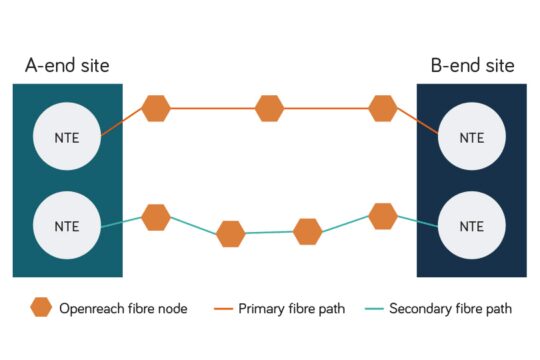
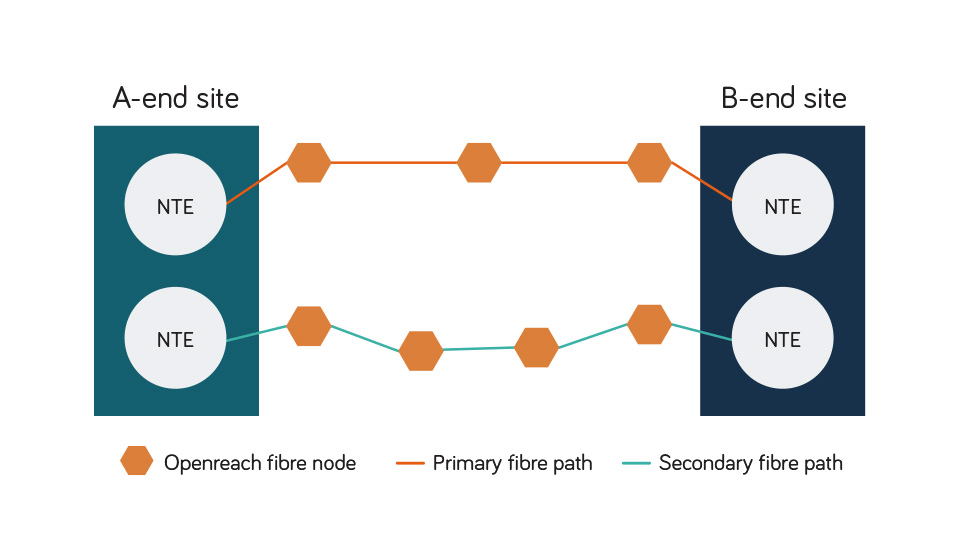
RO2 provides two completely separate fibre routes between sites: a primary and a secondary path. Each circuit is built through different ducts, cables and building entry points wherever possible, so a single local incident won’t take both routes down.

Each circuit terminates in its own Network Terminating Equipment (NTE) at both ends, meaning there are no shared physical components between the two paths.

RO2 (Resilience Option 2)

RO2 (Resilience Option 2) diagram showing separate primary and secondary fibre routes connected to different NTEs at each network endpoint.


Where available, circuits are also routed via different Openreach access nodes or exchanges, protecting your service from local exchange or node failures.

You or your connectivity provider decides how traffic moves between the two routes. Most businesses use automatic failover built into routers, firewalls or SD-WAN controllers. If the primary circuit is disrupted, traffic automatically switches to the secondary.

Protection should also continue through the provider’s core network, avoiding shared backhaul routes.

For example, with Neos Networks Business Ethernet, your network is routed through our diverse MPLS network. Self-healing and rerouting mean resilience is built in. For optical connectivity, you can configure diverse routes across our core network.

Because RO2 involves separate routing, a site survey is always needed to confirm viable routes and any excess construction charges (ECCs) before installation.

Why does RO2 matter for your business?

In 2024, 72% of senior UK IT decision-makers said that inadequate resilience led to disruption or downtime.

Downtime costs money. It can disrupt operations, break SLAs and damage reputations. Even short outages can affect customer experience, compliance or productivity.

RO2 matters because it’s the only Openreach-supported way to guarantee true end-to-end diversity between two circuits.

Ordering two circuits separately (even from different providers) doesn’t guarantee resilience. They often share ducts, exchanges or backhaul routes. As Openreach controls the access network, only RO2 can ensure full physical separation at the infrastructure level.

If your operations are mission-critical, time-sensitive or regulated, RO2 provides assured physical diversity in the Openreach access network.

What are the benefits of RO2?

Here’s how RO2 strengthens your network and supports your business.

Benefit What it means for your business
End-to-end physical diversity No shared ducts, cables or exchanges, from building entry to core network. Eliminates single points of failure across your wider network.
Maximum uptime and business continuity Minimises network disruption during faults, engineering works or local outages, helping to prevent costly downtime.
Supports compliance and SLAs Underpins trust and brand reliability for always-on services. Supports SLAs and regulatory uptime obligations in sectors like finance, health care and government.
Flexible design options Can be configured for the same site, split-site or dual-site resilience (see below for details). Available across Ethernet and optical services to suit different bandwidths and latency requirements.
Long-term value May require higher upfront installation cost but mitigates potential future losses from outages.


How to implement RO2 with your provider

When planning RO2 with your connectivity provider, it’s important to know what to ask for. Here are some key questions to confirm before going ahead.

What kind of resilience do you need?

Start by identifying where your network is most vulnerable. Do you need complete end-to-end diversity? Your provider should help assess which areas need diversity most based on your risk profile, network setup and location – from your local site to the access node, exchange and core network.

Which services will you use RO2 for?

RO2 is available for a range of Ethernet and optical services. Your provider should help you choose the right product based on bandwidth, latency and site requirements.

Here’s how RO2 strengthens your network and supports your business.

Service type Use case
Ethernet Access Direct (EAD) Most common RO2 deployment. Suitable for high capacity business connectivity.
Ethernet Backhaul Direct (EBD) Used for aggregating multiple Ethernet circuits. RO2 adds resilience to backhaul routes.
Optical Spectrum Access (OSA) Ideal for ultra-low latency and high-bandwidth applications. RO2 ensures physical diversity.
Optical Spectrum Extended Access (OSEA) Extends OSA reach. RO2 protects long-distance optical connectivity.


How should you configure the A-end and B-end of your connection?

RO2 supports three configurations depending on your site layout and resilience needs:

  • Same-site configuration: Both circuits run between the same A-end and B-end locations.
  • Split-site configuration: Circuits share the same A-end but terminate at two different B-end sites.
  • Dual-site configuration: Circuits terminate at different A-end and B-end locations.

Your provider should help you choose the right setup based on your business continuity strategy and network design.

Can your provider guarantee full physical separation?

Ask for confirmation that both circuits take completely independent routes. Only RO2 delivered by Openreach guarantees this level of resilience, avoiding shared ducts, exchanges and backhaul routes.

Will the circuits be routed through different Openreach access nodes or exchanges?

RO2 can route circuits via separate Openreach exchanges or access nodes, depending on availability and location. This protects you against local exchange or node failures.

Will each circuit have its own Network Terminating Equipment (NTE)?

Each RO2 circuit should terminate on independent NTEs, so a single equipment fault doesn’t affect both services.

How is traffic switched between the primary and secondary circuits?

Will you or your provider manage the failover? Most organisations use automatic failover through routers, firewalls or SD-WAN.

RO2 vs other diversity options

RO2 gives you route and exchange diversity in the access layer, removing single points of failure between your sites and the network. But it’s just one part of a wider Ethernet resilience strategy.

To build complete end-to-end resilience, combine RO2 with other design principles such as dual-homing, router redundancy, shadow VLANs, DDoS resilience and core network resilience.

Learn more about Ethernet resilience and diversity

Is RO2 right for your business?

If downtime isn’t an option for your business, RO2 is worth considering as part of your wider network resilience strategy. It’s ideal for:

  • Financial services, healthcare, utilities and media organisations that rely on always-on connectivity and strict uptime SLAs
  • Data centre operators and cloud providers needing resilient, high-capacity last-mile links
  • Public sector and emergency services where network continuity supports essential services and compliance
  • Organisations with mission-critical operations where even short outages can cause major disruption or financial loss

If you’re exploring resilience options for your network, Neos Networks can help. As a UK Critical National Infrastructure provider, supporting everything from energy to emergency services, we understand RO2 – the vital role it plays in delivering resilience for critical networks.

With over 600 PoPs and 90 data centres on-net, we deliver true end-to-end diversity across Ethernet and optical services nationwide. Our pre-sales team can help design a resilience solution that fits your network architecture and business goals.

Business Ethernet

Resilient, high-bandwidth connectivity for your business

You might also like

  • Article

What is Ethernet?

  • Ethernet
  • Article

What is 10 Gigabit Ethernet (10GbE)?

  • Ethernet

Enabling AI: is fibre the overlooked foundation of the UK’s AI future?

New research with 300 data centre operators, enterprises and local government leaders shows a clear consensus: without new high capacity fibre backbones, the UK won’t achieve its AI ambitions.

The UK’s ambition – AI superpower

The UK is determined to be an AI superpower. The government’s AI Opportunities Action Plan and AI Growth Zones are accelerating research, new data centres and advanced computing nationwide.

Billions of pounds in investment are already pouring in. The US-UK Technology Prosperity Deal alone commits £31bn from leading tech and AI firms.

But there’s a missing link. Without ultra-low latency, high-bandwidth fibre, data can’t move at scale and AI growth stalls. So how ready are the UK’s fibre networks for AI?

We surveyed 300 data centre operators, enterprise IT leaders and local government stakeholders. Their responses reveal both the risks and the opportunities ahead.

The fibre challenge – what the research shows

The findings highlight a shared concern: fibre availability is a critical barrier to AI growth:

  • 82% of data centre operators have delayed site builds or expansions due to fibre availability.
  • 89% of local government stakeholders report digital projects delayed by fibre gaps.
  • 45% of enterprises cite fibre as the key bottleneck holding back AI and digital infrastructure.

Almost half of local authorities (46%) say their region isn’t fully ready to support AI and data centres.

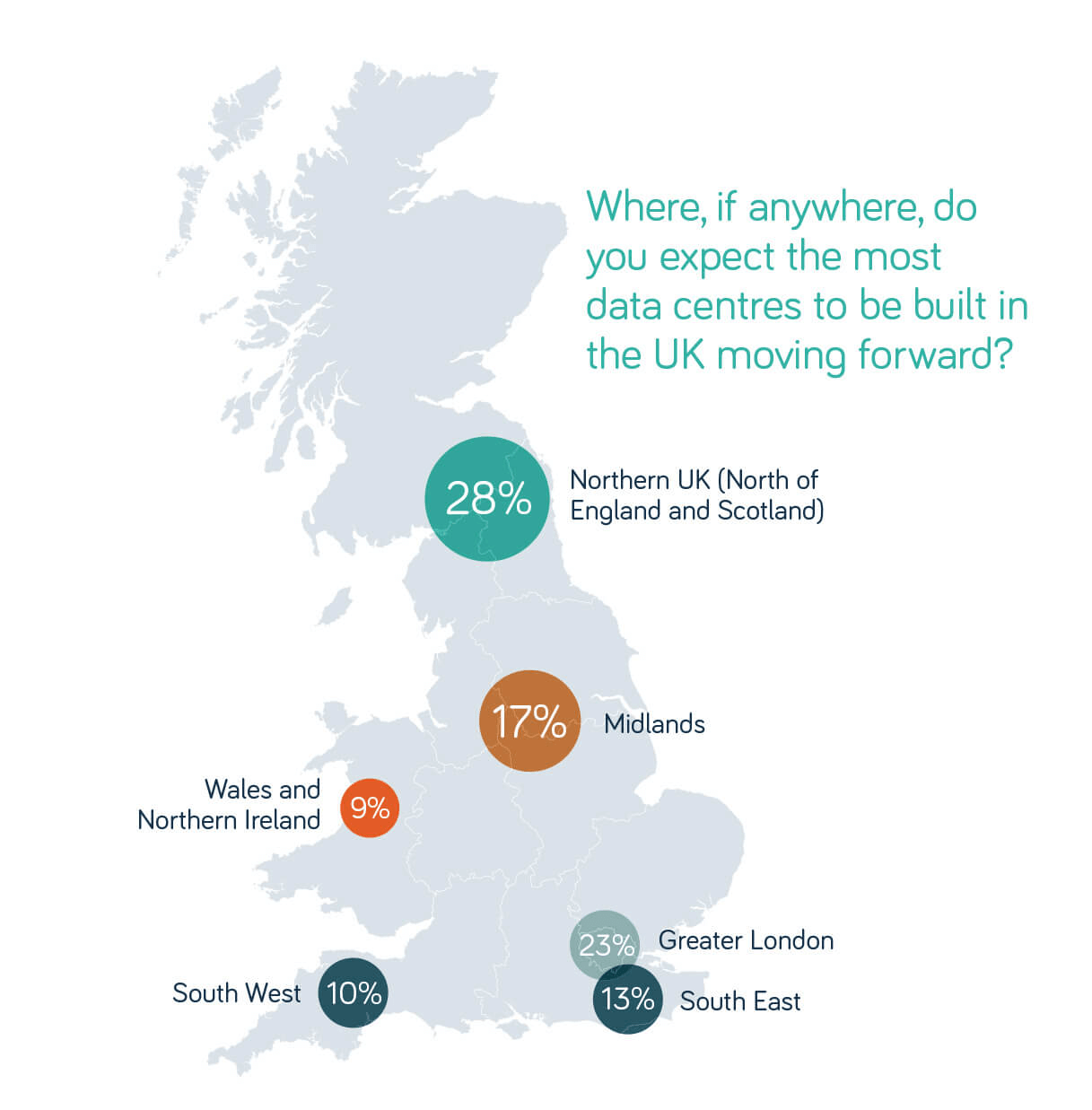
Yet regional hubs are emerging as the next growth engines. The Midlands and the North are fast becoming corridors of AI investment. Scotland and the North of England are uniquely positioned as a bridge between hyperscale clusters in North America and Europe, especially in the Nordics, where abundant renewable energy is driving growth.

Graphic showing where survey respondents expect data centres to be built in the UK, showing 28% for North of England and Scotland; 17% Midlands; 9% Wales & N. Ireland; 10% South West England; 13% South East; and 23% Greater London.

AI is also pushing computing to the edge. By 2030, almost all data centre operators (97%) expect up to half of their UK capacity to sit at the edge, dispersed across regional and local sites.

How can these growing hubs be connected? Without resilient, high capacity fibre between regions, the UK risks falling behind in the global AI race. But that risk also highlights a once-in-a-lifetime opportunity.

The fibre opportunity – building the foundation of UK AI

From data centres and enterprises to local government, the leaders we surveyed are united on the way forward: new fibre backbones are critical to unlocking AI growth.

Almost all respondents (95%+) said these projects would boost AI and data centre growth. And more than half of local authorities said such projects would be transformative for their regions.

The opportunity is clear: building national fibre backbones is essential for the UK to achieve its AI ambitions.

Download the full report for insights on:

  • Why fibre is the foundation of the UK’s AI future
  • How data centre operators, enterprises and local authorities see the risks and opportunities
  • The role of new backbone projects in transforming UK competitiveness

Ethernet resilience and diversity: building a reliable network for your business

Strengthen your UK business network with RO2, shadow VLANs and more.

Neos Networks | 26 September 2025

Business Ethernet

Resilient, high-bandwidth connectivity for your business

What is Ethernet resilience?

Ethernet resilience is the ability of your Ethernet network to maintain or quickly recover service when faults, failures or cyberattacks occur.

You can achieve resilience by design. That means building in diversity, redundancy and failover:

  • Diversity (separation): two or more independent paths, such as fibre routes entering your building through different ducts.
  • Redundancy: spare capacity or duplicate components that take over if one fails, for example, dual routers or twin power supplies.
  • Failover: the mechanism that switches traffic from a failed component or route to the backup.

Failover plays a vital role. Without it, diverse paths or spare capacity won’t protect your business when the primary service fails.

Why does Ethernet resilience matter for your business?

Ethernet resilience is vital because network outages can cost you dearly. In 2024, 72% of senior IT decision makers said that resilience problems led to disruption or downtime. And over 50% of businesses admitted suffering substantial financial losses after a major resilience disruption.

Strong resilience minimises downtime and disruption. By keeping your network running, it ensures business continuity when disaster strikes. But it’s not just about money.

It protects your reputation. Customers expect you to be available, and repeated outages can quickly erode trust.

It also underpins disaster recovery and data protection. In 2024, 43% of UK businesses reported experiencing a cybersecurity breach or attack. With a resilient network design, you can restore services quickly and reduce the risk of data loss.

And it supports growth. A resilient network keeps your team connected and productive, giving your business the stability it needs to thrive.

To build resilience, you first need to understand the threats your Ethernet network faces.

What are the main threats to Ethernet connectivity?

Cyberattacks overtook hardware failures as the leading cause of IT outages in UK businesses in 2024, accounting for 24% of incidents, up from just 10% in 2018. However, physical risks, such as fibre duct damage from roadworks, deliberate cable cuts, or infrastructure faults, remain common threats to Ethernet connectivity.

Here’s a summary of the main threats:

Threat Impact on your Ethernet network
Cyberattacks From ransomware to phishing, malicious actors can cause downtime, data loss and reputational harm.
DDoS attacks Attackers can overwhelm your network with traffic, disrupting service availability unless defences are in place.
Outdated systems or devices Legacy equipment with old firmware or insecure protocols creates vulnerabilities and instability.
Physical disruption / WAN link failures Fibre cuts, duct damage, or exchange faults can take you offline instantly.
Insufficient bandwidth Congested links slow performance and risk outages during peaks or heavy workloads.
Equipment misconfiguration Human error in setup or maintenance remains a significant cause of downtime.


That's why you need resilience designed into your Ethernet network.

Resilience options for your business Ethernet

Resilience depends on removing single points of failure. That means building in diversity, redundancy and failover across every layer of your Ethernet service.

Resilience Option 2 (RO2)

Resilience Option 2 (RO2) provides true route diversity in the last-mile/access network connecting your business to your provider’s infrastructure. RO2 provides two circuits with separate physical routes into your local site, for example, different ducts, cabling or entry points. This protects against physical damage, like fibre cuts and roadworks, one of the most common causes of downtime.

Without RO2, even if you order two circuits from Openreach or through different providers, Openreach will install via the shortest available path. So the two circuits will often share the same local routing.

RO2 provides local route diversity at the Physical Layer (Layer 1 of the OSI model). Paired with the right routing or redundancy protocols, it enables seamless failover: if one circuit goes down, the other seamlessly takes over.

Dual-homing

Dual-homing means connecting to two points of presence (PoPs) or network-to-network interfaces (NNIs). Even if you’ve bought RO2, both circuits may still terminate at the same provider PoP or NNI. That means a single point of failure.

Two separate hand-off points remove that risk: if one PoP fails, your traffic routes via the other.

Router redundancy

A third resilience option is redundant routing at the customer edge – where your premises connects to the access network. Even with RO2 and dual-homing, your customer premises equipment (CPE) or router can be a single point of failure. If your router or default gateway fails, it can cut off your whole site.

Using a virtual default gateway protocol like VRRP, a backup router automatically takes over if your primary router fails.

Shadow VLANs

A fourth option is shadow VLANs, which provide resilience at the Data Link Layer (Layer 2). A VLAN (virtual local area network) lets providers run independent, isolated connections over shared infrastructure, keeping your traffic safe and separate.

With shadow VLANs, a backup VLAN runs alongside your primary one. If the main data link fails, traffic can be redirected to the secondary data link using the shadow VLAN. That protects against faults or misconfigurations inside the provider’s Ethernet platform, adding a second, independent logical path through the provider’s core.

DDoS resilience

The physical and logical diversity options above strengthen your Ethernet connectivity, but they won’t protect your internet access if your connection is overwhelmed by malicious traffic. That’s where DDoS resilience comes in.

With Dedicated Internet Access (DIA), leading providers offer DDoS protection that filters or “scrubs” attacks before they reach your network. This helps ensure you stay online even under DDoS attack, protecting your business from one of the most common causes of downtime.

Core network resilience

The resilience of your Ethernet connection is only as strong as your provider’s core network. Leading carriers invest in high capacity, low latency backbones engineered for resilience.

For example, Neos Networks’ UK-wide core network uses a resilient mesh topology with diverse fibre routes. MPLS and IP fast reroute keep traffic moving seamlessly if a path goes down. Meanwhile, our Network Operations Centre (NOC) monitors the network 24/7, detecting and resolving faults before they affect your service.

All the above options can add resilience to your Ethernet network. The challenge is choosing the right mix for your business. That’s where Neos Networks can help.

Ethernet resilience and diversity solutions

At Neos Networks, our Business Ethernet services are built on our high capacity, UK-wide core network designed for Critical National Infrastructure. Scalable up to 100Gbps, they come with a full range of resilience options, from RO2 to shadow VLANs and more.

Business Ethernet

Resilient, high-bandwidth connectivity for your business

If you’re looking for Dedicated Internet Access (DIA), we provide services up to 10Gbps with resilience options including RO2, dual-homing and DDoS protection – all delivered using Ethernet as an underlay across our nationwide core network.

Not sure what connectivity is right for your mission-critical network? Get in touch. We’ll help you choose the resilient connectivity your business needs.

You might also like

  • Article

What is Ethernet?

  • Ethernet
  • Article

What is 10 Gigabit Ethernet (10GbE)?

  • Ethernet
  • Article

What is Metro Ethernet?

  • Ethernet

How to prevent DDoS attacks – advice for UK businesses

DDoS attacks are rising across the UK. Learn how to detect and stop them before they disrupt your business.

Neos Networks | 7 July 2025

DDoS Mitigation for DIA

Get Dedicated Internet Access with automated, 24/7 DDoS protection

What’s a DDoS attack?

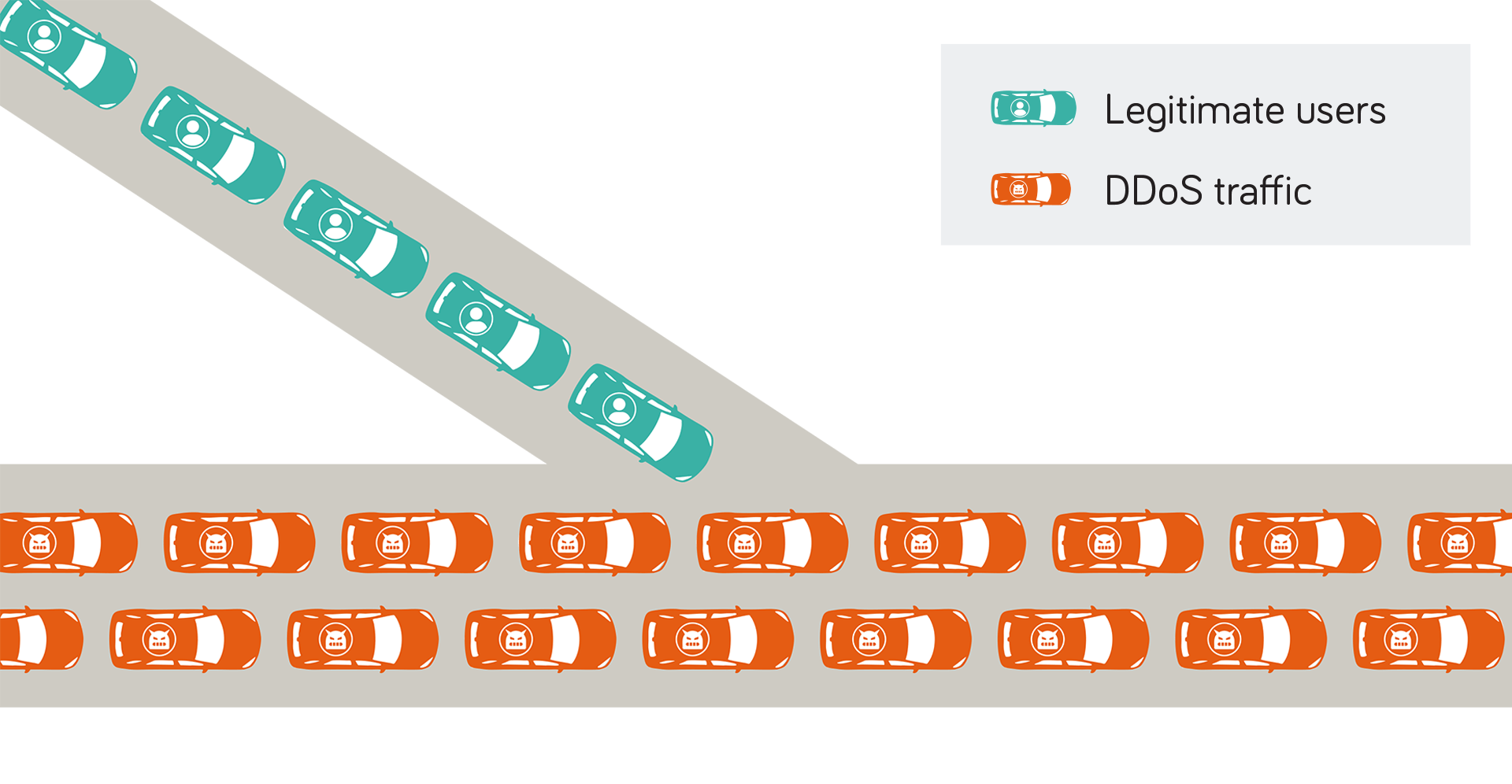
A distributed denial-of-service (DDoS) attack is a cyber threat that aims to make your website, server or online service unavailable by flooding it with excessive traffic from multiple sources. Like a traffic jam on a digital motorway, legitimate users get stuck behind a flood of fake or harmful requests – malicious traffic that blocks access to your services.

DDoS attacks block legitimate users

E-Line Carrier Ethernet showing a direct point-to-point connection between two locations across a provider's network

There are different types of DDoS attacks, often targeting different network layers. Volumetric attacks flood a site with traffic to consume bandwidth. Protocol attacks exploit weaknesses in how network protocols handle connections. Application-layer attacks mimic real users and overwhelm specific application functions.

Each requires a different mitigation approach, and many modern attacks combine methods for maximum impact.

Learn more about types of DDoS attacks

Why do DDoS attacks happen?

DDoS attackers may target your business for a variety of reasons:

  • Extortion: Attackers may demand a ransom, often in cryptocurrency, threatening to keep you offline until you pay up.
  • Sabotage: A rival business might launch DDoS attacks to undermine your services and gain a competitive advantage.
  • Hacktivism: Individuals or activist groups may use DDoS as a political protest to draw attention to their cause.
  • Diversion: A DDoS attack can act as cover for more serious threats like data breaches or deploying malware on your network.
  • Revenge: Disgruntled staff, former employees or customers might attack your systems out of personal grievance.

Understanding the motivation behind an attack can help shape how you respond. For example, extortion may require law enforcement or legal action, while politically motivated attacks might call for a PR response. But whatever the cause of a DDoS attack, you need the right technical defences to detect and stop it.

How to prevent DDoS attacks?

Stopping DDoS attacks involves a combination of early detection, automated mitigation and reducing DDoS attack vulnerabilities. Here’s how they work together.

DDoS detection

Early detection is vital to stopping a DDoS attack before it disrupts your business. Modern DDoS protection services continuously monitor traffic using various techniques to detect attacks, including:

  • Deep Packet Inspection (DPI) scans headers and payloads in real time, identifying malicious packets with greater precision.
  • Out-of-band monitoring uses flow data and telemetry from network devices to spot anomalies in traffic patterns, such as sudden spikes in demand.
  • Behavioural analytics uses baselines and data analytics to flag traffic that deviates from normal usage in real time, helping to identify covert or evolving threats.

Together, these methods give you fast, automated insight into abnormal traffic, enabling DDoS mitigation.

DDoS mitigation

Once an attack is identified, action must be taken immediately to block malicious traffic while allowing legitimate users through. Key mitigation measures include:

  • Infrastructure-based blocking: Routers and switches use DPI and real-time telemetry to filter malicious traffic at the network edge.
  • Rate limiting: The number of requests per IP or user is capped within a set time window to prevent your resources from being overwhelmed.
  • Scrubbing: Suspicious traffic is rerouted to a scrubbing centre, where it’s inspected and filtered before reaching your network.

Overall, you need layered protection across the network, transport and application layers (OSI layers 3, 4 and 7) to stop all major types of DDoS attacks.

DDoS attack surface reduction

A third pillar of DDoS prevention is reducing your network’s exposure to attack. Keep software up to date and patch known vulnerabilities promptly. Limit the number of exposed ports, services and endpoints to minimise the paths attackers can exploit.

In addition, use firewalls and access controls to restrict access to critical systems. Load balancers can also distribute incoming traffic across multiple servers, helping to absorb traffic spikes and maintain your services.

Overall, monitoring and detection, automated mitigation and a reduced attack surface provide robust defence against evolving DDoS threats.

DDoS Mitigation for DIA

Get Dedicated Internet Access with automated, 24/7 DDoS protection

The growing DDoS threat

DDoS attacks are rising fast. In 2024, global DDoS attacks surged by 550%, according to the Radware 2025 Global Threat Analysis Report. Europe, including the UK, saw the sharpest increase, linked to escalating geopolitical tensions.

Telecoms providers, financial services and government remain among the most targeted sectors: telcos were hit by 43% of global network-layer DDoS traffic, while financial organisations saw a 400% rise in attack volume year-on-year. The UK’s National Cyber Security Centre (NCSC) also reported a “stark increase” in state-aligned hacktivist DDoS strikes targeting critical infrastructure.

But all UK businesses are now vulnerable. As DDoS attacks become faster, cheaper and more automated, the NCSC urges organisations to strengthen their resilience against all cyber attacks.

5 tips to prepare for DDoS attacks

You can’t always prevent your business from being targeted, but you can reduce the risk of disruption. The NCSC recommends five practical steps to help you prepare for and respond to DDoS attacks.

1. Understand your service

Attackers can target different parts of your network to exhaust resources and cause disruption. Check which services are exposed to the internet, which are business-critical and who is responsible for protecting them – your team, your hosting provider or your network service provider.

2. Upstream defences

Your network provider is key in protecting you from large-scale DDoS attacks. Ensure they’re able to detect and deflect malicious traffic before it hits your systems. An automated service like Neos Networks' DDoS Mitigation for Dedicated Internet Access (DIA) can absorb attacks at the network edge and keep your services online.

3. Scaling

To handle sudden spikes in traffic during a DDoS attack, your network must have the flexibility to scale. For example, Neos Networks DIA offers automated DDoS Mitigation with bandwidth options up to 10Gbps, giving you the capacity to absorb large attacks and maintain service.

4. Response plan

If you’re hit by a DDoS attack, a clear response plan helps minimise disruption to your vital services. Your plan might include prioritising trusted traffic sources (such as UK-only IP addresses), preserving administrative access, and setting up fallback options for essential systems.

5. Testing and monitoring

Finally, regular testing helps ensure your defences are ready when you need them. Continuous monitoring lets you detect attacks early and respond before they escalate. Services like Neos Networks DDoS Mitigation and DDoS Monitoring give you the 24/7 visibility you need to keep your network secure.

DDoS solutions

At Neos Networks, we’ve designed our DDoS Mitigation to ensure you stay online, with always-on protection, real-time monitoring and layered defence.

We use Corero’s SmartWall ONE technology to deliver full edge protection for even the largest provider networks. Choose from three tiers of protection to suit your business needs:

  1. DDoS Mitigation: Real-time circuit-level auto-mitigation, 24/7 monitoring, weekly threat reports and custom configuration
  2. DDoS Monitoring: 24/7 monitoring, monthly threat reports and fast upgrade to DDoS Mitigation when needed
  3. DDoS Standard: DDoS-protected core network included with all DIA circuits at no extra cost

Learn more about DDoS protection

Ready to protect your business? Get a quote online with LIVEQUOTE.

DDoS Mitigation for DIA

DDoS protection for business internet: What is it and why do you need it?

DDoS attacks on UK businesses are rising fast and getting harder to stop. Here’s how they work, how they could affect your business and how to defend against them effectively.

Neos Networks | 3 July 2025

DDoS Mitigation for DIA

Get Dedicated Internet Access with automated, 24/7 DDoS protection

What is a distributed denial-of-service (DDoS) attack?

A distributed denial-of-service (DDoS) attack is a type of cyber threat that aims to disrupt websites, applications or online services by overwhelming them with excessive internet traffic.

Unlike a traditional denial-of-service (DoS) attack, which typically comes from a single source, a DDoS attack is “distributed” – launched simultaneously from multiple systems or IP addresses. This makes it much harder to trace and defend against.

DDoS attacks are often used to:

  • Disrupt business operations
  • Demand ransom payments
  • Make political or ideological statements

While they don’t breach systems or steal data, they can cause serious downtime, damage customer trust and lead to financial losses.

How do DDoS attacks work?

A DDoS attack works by overwhelming a website, server or network with an extraordinarily high volume of traffic from multiple sources, causing it to slow down or crash.

These attacks are typically launched using a network of compromised devices connected to the internet. Computers, servers or Internet of Things (IoT) devices are infected with malware, turning them into “bots” under the attacker’s control. Together, these bots form a “botnet”.

The botnet then sends a flood of requests to the target’s IP address – all at once from many different locations. This sudden surge overwhelms the system’s capacity, denying access to genuine users and effectively taking the service offline.

DDoS attack

E-Line Carrier Ethernet showing a direct point-to-point connection between two locations across a provider's network


Types of DDoS attacks

DDoS attacks can be categorised into three main types, targeting various aspects of a network or service. They typically focus on specific layers of the OSI model, particularly the Network Layer (layer 3), the Transport Layer (4) and the Application Layer (7).

Volumetric attacks

Volumetric attacks aim to saturate the target's bandwidth by overwhelming it with a massive volume of traffic. Techniques include UDP floods, DNS amplification and ICMP floods. These attacks typically operate at layers 3 and 4 of the OSI model.

Protocol attacks

These attacks exploit weaknesses in network protocols to exhaust server resources. Examples include SYN floods, Ping of Death and IP fragmentation attacks. They also target layers 3 and 4, disrupting how systems handle connections.

Application-layer attacks

Targeting layer 7, application-layer attacks mimic legitimate user behaviour to overwhelm specific applications or services. Common methods include HTTP floods and Slowloris attacks, which can be difficult to detect as they look like normal traffic.

Whatever the method, the impact of a DDoS onslaught can be severe, taking critical services offline and damaging customer trust.

The impact of DDoS attacks on UK businesses

UK businesses faced a 550% year-on-year surge in web DDoS attacks in 2024, according to the Radware 2025 Cyber Threat Report. The sharp increase was largely driven by hacktivist activity and rising geopolitical tensions.

The consequences have been significant. Across sectors, DDoS incidents have caused operational disruption, financial loss and reputational harm.

For example, a DDoS attack on the Royal Mail in 2024 caused widespread parcel delivery delays. Meanwhile, the telecommunications sector was the target of 43% of global network DDoS attacks, followed by the financial sector at 30%.

The lesson is clear: whatever your industry or business size, DDoS protection is now essential.

How to mitigate DDoS attacks effectively

DDoS mitigation starts by monitoring traffic to establish normal traffic patterns. That way, anomalies like bot activity or spoofed requests can be identified in real time.

Traffic is then filtered using IP reputation checks, deep packet inspection and rate limiting. The best systems use scrubbing, which removes malicious traffic before it reaches your network. In contrast, blackholing – which drops all traffic to a target IP address – can block both malicious and legitimate traffic.

Manual mitigation is no longer viable as modern attacks are too large and fast for human response alone. Instead, you need a DDoS protection service with:

  • Real-time monitoring: Detects abnormal spikes or suspicious patterns before they disrupt services
  • Layered defence: Protects at the network, transport and application layers to guard against all attack types
  • Traffic filtering and rate limiting: Controls the flow of requests to prevent overload
  • Scalable infrastructure: Includes built-in capacity to absorb attacks while mitigation takes effect
  • Always-on protection: Automated tools ensure round-the-clock defence, even when you're not watching

This is how we’ve designed our future-ready DDoS protection for Dedicated Internet Access (DIA) – to keep your services secure and connected at all times.

Neos Networks DDoS protection for DIA

Our DIA service now offers three levels of DDoS protection, so you can choose the option that fits your business needs:

1. DDoS Mitigation – Always-on, circuit-level protection

E-Line Carrier Ethernet showing a direct point-to-point connection between two locations across a provider's network
  • Real-time auto-mitigation of volumetric, protocol and application-layer attacks
  • 24/7 monitoring of all IPv4 and IPv6 traffic
  • Weekly DDoS threat reports
  • Easy customisation to fit your business needs


2. DDoS Monitoring – Visibility with upgrade path

E-LAN Carrier Ethernet showing any-to-any connections across a provider's network
  • Continuous DDoS monitoring for each DIA circuit
  • Monthly DDoS threat reports
  • Fast upgrade to DDoS Mitigation when needed


3. DDoS Standard – Core protection included as standard

E-Tree Carrier Ethernet connecting a central site to multiple sites across a provider's network, but the “leaves” (branch nodes) of the tree don’t exchange data directly
  • DDoS-protected core network (tails not included)
  • Included with all DIA circuits at no extra cost

Protect your business against tomorrow’s threats today. Get a quote for DIA with DDoS protection in minutes using LIVEQUOTE.

DDoS Mitigation for DIA

Project Reach: The UK’s biggest core fibre network deployment in decades will power the UK’s digital ambitions

Neos Networks | 26 June 2025

Neos Networks has today been selected by Network Rail to deliver Project Reach. This landmark initiative will see Neos Networks upgrade fibre connectivity along key Network Rail transport routes, transforming rail operations and improving customer connectivity along key routes.

But at its core, Project Reach is more than just an upgrade for the railways, it’s a critical step in advancing the nation’s digital capabilities. By deploying high capacity fibre across the country, Neos Networks is creating a digital backbone that will underpin future innovation. The demand for robust connectivity has never been greater, as businesses of all sizes increasingly rely on data-intensive applications, from new AI-driven analytics services to real-time cloud computing.

The new network will serve the dual purpose of enhancing railway operations while also enabling wider commercial use, supporting industries that depend on high-bandwidth, low latency connectivity.

A nationwide fibre backbone

The first phase of the rollout will see Neos Networks deploy 1,000km of ultrafast, state-of-the-art fibre optic cable along the lengths of the East Coast Main Line (the route from London King’s Cross to Newcastle); the Chiltern Main Line from Marylebone to Birmingham, and the West Coast Main Line from Birmingham to Manchester; and the Great Western Main Line (the route from London Paddington to Cardiff).

By extending the network across these strategic routes, Neos Networks is connecting key business hubs, data centres and core subsea landing stations that connect the UK to North America and wider Europe. As demand for connectivity surges – from AI-driven services, to edge computing and low latency business connectivity – the network will provide the resilience and capacity needed to support the UK’s digital economy.

For Neos Networks CEO Lee Myall, the project represents a milestone in national connectivity: “This is the largest core fibre network deployment across the UK in decades. It won’t just transform Network Rail’s services and the connectivity offered to customers, but also advance the UK’s digital ambitions by connecting key data centres that will underpin the future of AI, and vital submarine infrastructure that is bringing global data into the region.

“The deployment of this network will have far-reaching benefits across industries, from finance and healthcare to media and manufacturing. High-speed, low latency connectivity will unlock new opportunities, accelerating 5G rollout, cloud services, and AI-driven innovation. Project Reach demonstrates the combined power of public and private investment – seeing transport and telecoms infrastructure come together to drive economic and technological progress.”

What is Carrier Ethernet?

Carrier Ethernet enables you to link your dispersed business sites with high capacity, scalable and cost-effective Ethernet connectivity. Learn how it works, what services are available, and how it could benefit your business.

Neos Networks | 15 May 2025

What is Carrier Ethernet?

Carrier Ethernet is a network service that extends Ethernet technology beyond local area networks (LANs), allowing businesses to connect one or more sites over long distances. Typically used to build wide area networks (WANs), it provides high capacity Ethernet connectivity between geographically dispersed locations, such as branch offices, data centres or cloud service providers.

How does Carrier Ethernet differ from traditional Ethernet?

While Carrier Ethernet and traditional Ethernet both rely on Ethernet protocols, traditional Ethernet is designed to connect devices within a single site, such as an office or campus. By contrast, Carrier Ethernet uses a network service provider’s managed infrastructure to connect one or more sites, often over greater distances or across geographically dispersed locations.

Here’s a breakdown of the key differences:

Ethernet vs Carrier Ethernet

Traditional Ethernet Carrier Ethernet
Geography Connects devices within your local area network (LAN) Connects one or more geographically dispersed business sites via a service provider
Management Managed internally by your IT team Fully managed service with monitoring and SLAs
Distance Limited to a single site, like an office or campus Suitable for metro, regional, or geographically dispersed links
Delivery Runs over your internal cabling and hardware Delivered via a provider’s managed infrastructure
Speed Typically up to 1Gbps, though higher LAN speeds (e.g. 10Gbps) are possible Often supports 1Gbps to 100Gbps, depending on the service
Scalability Limited by your existing LAN infrastructure Easily scalable to meet growing bandwidth demands
Resilience Depends on your on-site setup Built-in redundancy and carrier-grade fault tolerance
Standards IEEE Ethernet standards (e.g. 802.3) IEEE Ethernet standards plus Metro Ethernet Forum (MEF) specifications
Typical uses Connecting computers, printers and servers on-site Linking branch offices, data centres or cloud services


Types of Carrier Ethernet services

Carrier Ethernet is a collection of service types standardised by the Metro Ethernet Forum (MEF) to meet different business needs. Here are the main service types for end-user subscribers.

E-Line (point-to-point or point-to-multipoint)

The most common Carrier Ethernet service, E-Line, provides a dedicated point-to-point (P2P) connection between two sites. Also known as Ethernet Private Line (EPL), it provides a P2P Ethernet Virtual Connection (EVC) between a pair of user network interfaces (UNIs). It’s ideal for businesses that need a secure, high-capacity link between two fixed locations.

E-Line (P2P)

E-Line Carrier Ethernet showing a direct point-to-point connection between two locations across a provider's network

If you want to connect multiple sites, you can use E-Line in Ethernet Virtual Private Line (EVPL) configuration. EVPL supports point-to-multipoint (P2MP) connectivity by enabling multiple EVCs per UNI.

E-Line (P2MP)

E-Line Carrier Ethernet showing a direct point-to-point connection between two locations across a provider's network


E-LAN (multipoint-to-multipoint)

Enabling any-to-any connectivity, E-LAN, also known as Ethernet Virtual Private LAN, is the carrier equivalent of Virtual Private LAN Service (VPLS). E-LAN allows three or more sites to exchange data directly with each other. This is suitable for organisations with distributed branches requiring consistent performance between sites.

E-LAN

E-LAN Carrier Ethernet showing any-to-any connections across a provider's network


E-Tree (rooted-multipoint/hub-and-spoke)

E-Tree connects a central site to multiple sites, but the “leaves” (branch nodes) of the tree don’t exchange data directly. It’s commonly used in scenarios that require point-to-multipoint (P2MP) connectivity with strict traffic separation, such as data centre, enterprise and service provider networks.

E-Tree

E-Tree Carrier Ethernet connecting a central site to multiple sites across a provider's network, but the “leaves” (branch nodes) of the tree don’t exchange data directly


E-Access (network-to-network)

Designed for service providers, E-Access provides a local access connection to another carrier’s network via an external network-to-network interface (NNI). If you’re a service provider, it enables you to extend Ethernet services beyond your own footprint, for example, to reach off-net customer locations in last-mile scenarios.

E-Access

E-Access Carrier Ethernet connecting an operator's network to another provider's network


For instance, at Neos Networks we provide point-to-NNI (P2NNI) E-Access connectivity, enabling you to connect multiple sites back to your network as efficiently as possible.

A subset of E-Access, Transit E-Access, allows a network service provider to hand off traffic to another operator without using an external NNI.

How does Carrier Ethernet work?

Carrier Ethernet works by using standard Ethernet protocols to deliver high capacity connectivity over a telecom provider’s managed network. It combines Ethernet with carrier-grade standards to ensure scalability, reliability and Quality of Service over longer distances.

Carrier Ethernet standards

First standardised in 1983 as IEEE 802.3, Ethernet initially used coaxial cables to transmit data at a maximum of 10Mbps across LANs up to around 500m. As demand for Ethernet-style simplicity grew beyond local area networks, service providers began delivering Ethernet over fibre networks in a metropolitan area, a model known as Metro Ethernet.

Founded in 2001, the Metro Ethernet Forum (MEF) introduced a set of global standards for Metro Ethernet. In time, these evolved into Carrier Ethernet, which delivers high-bandwidth data transmission over longer distances – regional, national or international wide area networks.

Building on IEEE Ethernet standards, Carrier Ethernet adds MEF-defined features, including:

  • Standard service types like E-Line, E-LAN, E-Tree and E-Access
  • Guidelines for traffic management to ensure Quality of Service
  • Operations, Administration and Maintenance (OAM) standards for fault management and performance monitoring
  • Service-level agreements (SLAs) to ensure performance, uptime and support

These standards ensure Carrier Ethernet delivers the scalability and reliability needed for business-critical networks, whether connecting sites within a city or across regions and countries.

Carrier Ethernet vs Metro Ethernet: what’s the difference?

Put simply, Metro Ethernet refers to Ethernet services delivered within a metropolitan area, while Carrier Ethernet supports Ethernet connectivity across larger networks, with added scalability and service assurance.

Metro Ethernet can be delivered using proprietary technologies or based on MEF Carrier Ethernet standards. When delivered to MEF specifications, it’s a subset of Carrier Ethernet, offering the same performance, scalability and interoperability over a metropolitan area network (MAN).

Here’s a summary of how they differ:

Metro Ethernet vs Carrier Ethernet

Metro Ethernet Carrier Ethernet
Geography Typically limited to a metropolitan area Designed for metropolitan, regional, national or international networks
Service types Can support MEF-defined services like E-Line and E-LAN Always supports MEF-defined service types
Scalability Scalable for local or metro-scale connectivity Highly scalable to support wholesale and multi-site enterprise networks
Management MEF-compliant services may include SLAs and monitoring Managed service with SLAs, performance guarantees and OAM
Interoperability May be limited if proprietary; MEF-compliant networks support interoperability Designed for full multi-vendor, multi-operator interoperability
Typical uses Connecting sites within a metropolitan area or city-wide campus Connecting sites across cities, regions or countries


While both Metro Ethernet and Carrier Ethernet support high-speed connectivity, Carrier Ethernet offers greater scalability. It supports higher bandwidths, wider geographic reach and more advanced service options for large-scale enterprise and wholesale use.

What are the benefits of Carrier Ethernet for businesses?

Whether you’re connecting two locations or building a multi-site network, Carrier Ethernet offers a high-performance, cost-effective alternative to legacy WAN technologies. Here are some of its key advantages:

  • High bandwidth: Scalable speeds from 10Mbps to 100Gbps
  • Scalability: Easy to add bandwidth or connect new sites as you grow
  • Flexibility: Supports point-to-point, multipoint and hybrid network topologies
  • Cost efficiency: Typically lower cost than traditional WAN technologies like MPLS or leased lines
  • Reliability: Built-in redundancy, Quality of Service guarantees and SLAs for uptime and performance
  • Interoperability: Based on open standards that support integration across providers, networks and equipment vendors.

From large enterprises to public sector bodies, many organisations use Carrier Ethernet to support mission-critical connectivity across multiple sites.

Who uses Carrier Ethernet?

A wide variety of sectors rely on Carrier Ethernet to connect locations and users with consistent performance. Typical users include:

  • Enterprises: connecting branch offices, data centres and cloud services
  • Service providers: extending reach and delivering managed Ethernet services
  • Retail chains: linking stores, warehouses and payment systems
  • Media companies: transmitting live video across production and post-production sites
  • Financial services: enabling secure, low latency connectivity between offices, data centres and trading environments
  • Public sector: supporting secure, private networks for health care, education, local authorities and government departments

Whether supporting core business systems, cloud access or remote site connectivity, Carrier Ethernet underpins a wide range of business-critical networks.

Carrier Ethernet solutions

At Neos Networks, we deliver high capacity, fully managed Carrier Ethernet services designed for your business across our extensive UK-wide fibre network. Our Business Ethernet solutions are scalable, resilient and backed by stringent SLAs – built to support your most business-critical operations.

Speak to one of our experts to discuss your options. Whether you’re looking to connect data centres, branch offices or dispersed sites, we’ll be happy to make Ethernet work for you.

Speak to an expert

Carrier Ethernet FAQs

  • Is Carrier Ethernet secure?

    Yes, Carrier Ethernet services are typically delivered over dedicated connections operating in Layer 2 (Data Link Layer) of the OSI model. That means they’re physically separate from the public internet, making them highly secure for sensitive business data.


  • Can you use Carrier Ethernet to access the internet?

    Yes, Carrier Ethernet can be used to deliver Dedicated Internet Access (DIA), a private, high-speed, uncontended connection between your premises and the internet.

  • How does Carrier Ethernet compare to MPLS?

    Carrier Ethernet is a Layer 2 service providing high capacity, point-to-point or multipoint Ethernet connectivity over a managed service provider network. In contrast, MPLS (Multiprotocol Label Switching) operates between Layers 2 and 3 (Data Link and Network layers) and routes data using labels rather than traditional IP addressing. Carrier Ethernet is a simpler, cost-effective solution for high-performance site-to-site connectivity, while MPLS is better for larger or more complex networks requiring advanced traffic engineering and routing. However, providers may use MPLS in their core networks to help transport Carrier Ethernet services across longer distances or between dispersed sites.

  • Does Carrier Ethernet support Quality of Service (QoS)

    Yes, Carrier Ethernet supports QoS, allowing you to prioritise traffic to ensure consistent performance for your critical services. However, MPLS typically offers more advanced QoS with more granular control over traffic classes and routing for more complex, large-scale networks.

You might also like

  • Article

What is Ethernet?

  • Ethernet
  • Article

What is 10 Gigabit Ethernet (10GbE)?

  • Ethernet
  • Article

What is Metro Ethernet?

  • Ethernet

Core network vs access network: what’s the difference?

Learn how core networks differ from access networks, and why choosing the right architecture is key to fast, reliable business connectivity.

Neos Networks | 1 May 2025

At a high level, communications networks can be divided into three broad segments: core, regional and access networks. We explain how they differ and why it matters for your business’s connectivity.

What is a core network?

A core network, also known as a backbone network, transports massive data volumes over long distances at extremely high speed. It connects regional and international data centres, internet exchanges and large-scale service providers.

Core networks use technologies like optical connectivity and DWDM for long-distance, high capacity data transmission, while protocols like MPLS and BGP manage traffic and routing. The prime example of a core network is the internet backbone, which spans continents and links major global network operators.

What is a regional network?

A regional network, also known as the “middle mile”, acts as a bridge between national core networks and local access networks. It transmits data between regions and cities, connecting smaller network operators, mobile networks and large enterprise sites to each other, regional data centres or the wider internet.

Regional networks use high capacity optical fibre links and technologies like Carrier Ethernet, optical networking and IP/MPLS to manage traffic efficiently. They provide regional data centre interconnects, connect Altnet networks, and deliver backhaul for fixed and mobile networks.

What is an access network?

Also known as the “last mile”, an access network is the final stretch of a telecoms network that connects your premises to your service provider’s infrastructure. Last-mile connections typically use fibre optic, coaxial or copper cables, with 4G/5G radio, P2P microwave radio, or satellite links used in mobile networks or remote locations without fixed-line access.

With FTTP or FTTC business broadband, the last mile is typically a contended passive optical network. That means bandwidth is shared with other users, and your internet speeds may fluctuate. In contrast, most high capacity business networks use Ethernet or DIA leased lines to provide uncontended access, consistent speeds and improved reliability.

Core network vs access network: what’s the difference?

In short, core networks are high-speed backbone networks transporting data over long distances, while access networks are local, connecting end users to network service providers.

Core networks are built for speed and resilience, prioritising high capacity links and redundancy. By contrast, access networks are typically designed for coverage and cost-efficiency, often using contended infrastructure, especially in consumer networks. However, business-grade access networks use leased lines and Ethernet services to provide dedicated, uncontended connectivity with guaranteed performance.

Here’s a summary of how they differ:

Core network vs access network

Core network Access network
Function Provides high-speed data transmission across long distances Connects end users to the service provider’s network
Geographic area National and international – connecting cities, countries and continents Local – connecting buildings, streets and neighbourhoods
Capacity Very high to transport high aggregated data volumes Lower, designed for individual or small group usage
Technology Optical connectivity, DWDM, MPLS, BGP FTTP/FTTC, DSL, leased lines, Ethernet, 4G/5G, P2P microwave radio
Topology Often uses mesh or ring architecture for redundancy and resilience Typically uses star or bus topology for simplicity and low cost
Users Primarily serves ISPs, data centres, large enterprises and other major network operators Links individual businesses, homes, and mobile devices, as well as Altnet networks at exchanges
Ownership Often owned by large telecom companies or governments Can be owned by ISPs, mobile network providers, or local government
Priorities High capacity, low latency, reliability Accessibility, low cost, Quality of Service (QoS) for end users


As for the OSI model, core networks typically span the data link, network and transport layers (layers 2 to 4), using technologies like MPLS (often described as layer 2.5), IP routing and TCP/UDP protocols. On the other hand, access networks mainly operate in the physical and data link layers (1 and 2), although Dark Fibre can operate as an access network below these layers.

How does data flow between core and access networks?

Core, regional and access networks work together to connect end users to the internet, cloud platforms and business-critical services. Here’s a simplified breakdown:

  1. Core network: Carries large volumes of aggregated traffic over long distances, linking to national backbones, internet exchanges, cloud platforms and data centres.
  2. Regional network: Transports traffic across towns, cities or regions, aggregating data between access and core layers.
  3. Access network: Connects your premises or end-user devices to the nearest cabinet, exchange, point of presence or base station.

Core network vs regional network vs access network

Diagram showing core networks vs access networks and the role of regional networks


Together, they provide the connectivity your business needs – linking sites, cloud services and the wider internet.

Why network architecture matters for your business

Understanding the roles of core, regional and access networks is vital when choosing the right connectivity for your business. Not all networks are created equal. Your provider’s network design and resilience determine how reliably your sites interconnect, access the internet and run the real-time applications your business relies on.

First, does your provider operate a resilient, high capacity core network built for low latency critical business applications? A robust core network is essential for site-to-site connectivity and seamless access to the internet and cloud services.

Second, does your provider offer nationwide reach and a choice of last-mile providers to deliver the best connection where you need it? This helps ensure reliable, cost-effective connectivity at every site, including remote or harder-to-reach locations.

Ultimately, you need to determine your business’s priorities – capacity, latency, resilience or reach – and ask the right questions when evaluating providers.

Connectivity you trust, built for your business

At Neos Networks, we deliver high capacity, low latency connectivity for UK businesses of all sizes. As a Critical National Infrastructure provider with the UK’s largest business-dedicated fibre network, we deliver always-on networks for organisations nationwide.

Whether you need Dedicated Internet Access, Business Ethernet, Optical Wavelengths or Dark Fibre, we’ll design a network tailored to your needs and scalable for long-term growth.

Want to explore your options?

Speak to an expert

Let’s make connectivity work for your business.

You might also like

  • Article

What is a backbone network?

  • Dark Fibre
  • Article

What is backhaul in networking?

  • Ethernet
  • Article

What is data centre interconnect (DCI)?

  • Optical

How can Altnets transition from disrupting to defining the UK connectivity market?

We spoke to 100 senior decision-makers at UK-based Altnets to find out.

Neos Networks | 1 May 2025

Executive summary

As a vital part of the UK’s connectivity landscape, Altnets have been a positive disruptive force, challenging long-reigning incumbents. The billions they’ve attracted in investment have been instrumental in accelerating the UK’s fibre rollout, spurring new fibre builds across the country. Since their inception in 2018, Altnets have now made fibre available to over 40% of UK premises, contributing to the UK's full-fibre broadband rollout, which is set to reach 96% of homes and businesses by 2027, according to Ofcom.

But with increased competition in the market and the right incentives from government, the incumbents have also doubled down on their efforts to deploy fibre-to-the-premises (FTTP). The result is that many Altnets are now struggling to generate the revenue needed to ensure longer term sustainability. Consolidation is starting to pick up speed as investor caution increases in the face of lagging customer growth.

Simply put, the Altnet market has reached a critical juncture. Neos Networks spoke to Altnets across the UK to investigate the challenges they currently face in the market and the different strategies they’re exploring to redefine themselves as mainstays in the UK’s connectivity landscape.

The Altnet squeeze: navigating competition, capital constraints and regulation

Overbuild and increased market competition (challenge 1)

The competition with incumbents has often been a race to see who can build new fibre the fastest. As incumbents seek to maintain their market share and Altnets seek to grow theirs, the UK has become a patchwork of network overbuild. In many areas, premises can choose between three or even four providers for their fibre.

In these decisions, incumbents have the upper hand. While passing homes might have been the initial goal for Altnets, getting customers to sign up to these services is another challenge. Incumbents are buoyed by historic brand equity, making it harder for Altnets to compete, with 34% of Altnets suggesting brand awareness is the greatest challenge getting in the way of their goals.

In many cases, it comes down to who got there first. 55% of Altnets said that customers being locked into existing contracts was a significant struggle for them, limiting their ability to generate subscribers where they’ve built their networks. Understandably, consumers are accustomed to providers like BT, Sky or Virgin Media, and switching to an unfamiliar provider can sometimes feel like an unnecessary hassle or even a risk.

Despite initiatives like the One Touch Switch scheme being introduced to simplify ISP switching, it still doesn’t solve the issue entirely. With so many customers preferring to bundle broadband with other services like TV and mobile, switching to a broadband-only Altnet provider seems like a step backwards. It’s here again that the market power of the incumbents comes into play, with their pre-existing relationships allowing them to super bundle services across entertainment, gaming, fitness and more through a single subscription.

Altnet's main challenges

Financial pressures (challenge 2)

The tough economic conditions affecting the wider market have been similarly tough on Altnets. Build costs have been steadily rising as they’ve continued expanding their footprints, making customer acquisition even more vital.

Where funding may have previously been more accessible, investors too are turning their attention towards take-up as the key measure of ROI, causing a hesitancy to invest further. As a result, nearly half of Altnets (46%) said that it’s become more challenging to access funding over the past year.

Altnet bar chart showing how difficult it is to secure financing

High interest rates are only exacerbating this challenge, with 48% of Altnets citing them as a primary reason behind their struggle for funding. Regulatory constraints (41%) and strict lending criteria (41%) were also significant barriers as Altnets look to secure financing.

Altnets bar chart showing barriers to securing finance

Apart from the inflationary pressures impacting build and the difficulties accessing funding, our research revealed another notable financial challenge. As BT continues to reduce the number of PSTN exchanges in use over the next decade, Altnets reliant on these locations face gaps being left in their networks – gaps that will be costly to close. On average, Altnets reported that the closures will cost them £1.4m (see appendix), according to our findings.

Regulation (challenge 3)

According to our research, regulatory barriers (38%) remain the most cited external factor hindering Altnets from achieving their wider goals.

The regulatory picture continues to evolve with the new Telecoms Access Review published for 2026-31. However, in aiming to balance investment with competition, Ofcom has recognised (and sought to remedy) the significant market power of Openreach, while also supporting market conditions in which they have traditionally taken advantage of this monopolised position.


“Our Altnet partners have been very clear about some of the structural challenges that deter competition and limit private investment in key regions. As an example, they’ve highlighted a tactic whereby Openreach announces FTTP expansion plans for specific areas without firm deployment timelines. This strategy discourages Altnets and investors from committing to those areas, as they fear being undercut by Openreach's rollout at a later stage. And in many cases, Openreach has then delayed or deprioritised those announced deployments.”

Lee Myall, CEO of Neos Networks


It’s easy to see how this stymies competition and could slow down nationwide coverage targets.

But beyond this, the Independent Networks Cooperative Association (INCA) has also raised concerns in a number of other areas, including inaccurate estimates of Altnet costs impacting fairness and competition calculations. They’ve also alleged that Openreach has purposefully overbuilt in areas where Altnets have been awarded Project Gigabit contracts to take advantage of the attention to pick up customers.

INCA continues to raise a number of such concerns about Openreach’s market advantage, reporting claims of favourable pricing being given to internal customers and suggesting that Openreach’s “incumbent advantage” allows them to overbuild competitors. While INCA has suggested restrictions that could be introduced to limit Openreach’s advantage, any action will be a long time in the works. For the time being, Altnets will have to reckon with Openreach’s purported advantages.

Reshaping UK broadband: putting customers first

Even without the issue of overbuilding, as challengers to incumbents, Altnets were unlikely to ever compete individually from a reach perspective. At last count, Openreach covered 17 million premises, with the largest Altnet CityFibre trailing behind at coverage of 4.3 million premises.

Instead, they’ve taken a different approach, trying to change people's perceptions of connectivity providers. Where incumbents are often presented as faceless utility providers to their customers, Altnets have instead engaged directly with their local communities to put customer satisfaction at the heart of everything they do. They’ve made this such a central part of their strategies that 55% of the Altnets we surveyed say that improving customer satisfaction is their primary goal for the next few years – a motivation that ranked ahead of other, more revenue-critical objectives such as increasing customer subscriptions and driving operational efficiencies.

Altnets bar chart showing their main priorities over the next two years

This aim is evident in how Altnets have operated since they entered the market. Unlike incumbents, they’ve frequently partnered with local councils, hosted community events, and involved residents themselves in planning decisions as they considered their rollouts. The focus seems to have paid off so far: Altnets consistently have far better customer satisfaction scores when compared to legacy providers.

The customer-satisfaction imperative has been a critical differentiator and successful strategy to pin their hopes to, but as Altnets look to the future at what seems like a critical juncture, we wanted to look at how this focus might be evolving as they mature.

However, while the customer-first approach has served Altnets well, our survey suggests a recognition that to achieve long-term success in the market, a strong dedication to customer service alone isn’t enough. The Altnets we spoke to are exploring varied and diverse strategies that seek to marry that customer-centric approach with strategic expansion and vital tech-driven innovation.

Partnering for long-term success

In keeping with the industry expectations of consolidation, partnerships of varying descriptions were a popular move for the Altnets we spoke to. In fact, the overwhelming majority (96%) reported that they're planning partnerships with other service providers to expand their reach.

It’s clear that they recognise a customer-first approach can only take you so far in their struggle to grow customers. For those looking to expand their customer base at pace, partnerships are by far the easiest route. So it makes sense that for over half (52%) of Altnets, accelerating customer growth was their main motivation for pursuing partnerships.

Many Altnets may have started out specialising in fibre built-outs in specific, underserved areas, but with full-fibre coverage now reaching 7 out of 10 households, it’s clear this strategy has limitations. Altnets recognise this, with 43% highlighting expanding geographic reach as a major driver behind their partnership efforts. With increasingly limited regions left in the UK without coverage, accelerating new fibre builds no longer make sense as a viable commercial strategy. Instead, expanding into new areas through partnerships with existing providers is becoming a far more attractive option to expand reach whilst minimising risk.

Alnets bar chart showing the number of Altnets considering merger or acquisition

Scaling their networks – and with that, their customer base and profitability – is a clear and feasible solution. But, as our research shows, there are several barriers that Altnets need to surmount to get there. Incumbent rollout competition (20%), technology access (27%) and deployment resources (19%) were all identified as significant blockers to network expansion.

Altnets bar chart showing their main barriers to scaling

Many are turning to established service providers, with 56% planning to partner with them. And understandably so. This has already been successfully demonstrated by CityFibre and TalkTalk, who first partnered to allow TalkTalk to sell consumer broadband via CityFibre’s network, before expanding to include Ethernet. This ongoing partnership has unlocked an additional 100 locations for TalkTalk, extending their reach while allowing CityFibre to further monetise their network investments.

Another route for Altnets is to partner with wholesale providers to expand their reach – connecting disparate networks and backhaul traffic. 48% of Altnets are already considering this. Some may be looking to extend their own reach, while others may seek to connect their acquired footprints together following acquisitions or mergers. By working with a core or transport partner, Altnets can continue to offer the same agility, flexibility and support that their customers have come to expect, making it a popular option.

Neos Networks-LightSpeed case study

Partnering with a wholesale network provider is a strategy many Altnets have already found success with, as demonstrated by Neos Networks’ partnership with LightSpeed. The Altnet was looking to expand its FTTP to additional premises across the Midlands and East of England and turned to Neos to leverage its UK-wide network. With access to Neos’ infrastructure, LightSpeed is able to connect to premises at pace while maintaining its connectivity quality and driving sign-ups.

Altnets bar chart showing the number of Altnets considering various kinds of partnerships

However, partnering with external providers always carries some risk. For Altnets, finding a similar cultural ethos and technical synergies will be essential. Having built their reputations as customer-service-focused providers, Altnets will need partners with the same dedication. If not, they could extend their reach but at the expense of their reputation, making it a questionable endeavour. In this vein, you might expect Altnets to partner closely with their peers, yet only 36% plan to partner with other Altnets.

Why is this? Bain & Company estimate that a fibre network requires a take-up rate of 35% to be commercially viable long-term. And with over 100 Altnets active in the UK at last count, the maths simply doesn’t add up. Last year, the Altnet average take-up was just 15%. While other Altnets might be the perfect cultural fit, there isn’t room for everyone in this new consolidated market.

Standing out to stay ahead

Establishing productive partnerships, or merging with another provider, is a sure-fire way to extend reach, but growing average revenue per user (ARPU) is equally important. Ultimately, many are exploring methods to further differentiate themselves, offering top-end technology or even packaging additional services.

Becoming an Altnet-of-all-trades

When asked what their main long-term ambition was as a company, aspiring to become multi-service providers beyond just broadband came out on top.

Bar chart showing Altnets long-term ambitions

Altnets recognise that, apart from network expansion and integration, to gain additional market share they will also need to differentiate themselves beyond their customer service credentials. For most, brand awareness is one of the major barriers, but by branching out beyond residential broadband, they can differentiate their services, unlock new revenue opportunities and encourage loyalty.

Many are already looking to deploy additional products and services. Expansions into smart home tech (46%), enterprise connectivity (43%), and security (42%) ranked as the most common services that Altnets are looking to implement in the future.

Security offerings (40%), and 5G Fixed Wireless Access (39%) are also seen as major areas of innovation for Altnets.

Altnet bar chart showing the services Altnets are providing to differentiate themselves in the market

Community Fibre case study

One provider already putting this strategy into action is Community Fibre:

  • Currently offers several broadband, TV/streaming and security bundles.
  • Saw an 85% increase in its customer base last year, bucking the Altnet trend.
  • Continues to keep a customer-first focus, with three times more 5* Trustpilot reviews than VMO2, Sky and BT combined.

Network technology for a competitive edge

Perhaps unsurprisingly, when asked what technologies they were using to help differentiate themselves from their competitors, most respondents said they were deploying Software-Defined Networking and Network Function Virtualisation (53%). This technology-driven approach gives Altnets a competitive edge by enabling cost-efficient, agile and scalable network operations, while the incumbents are often locked into legacy infrastructure.

As the top technology-related investment priorities focus on agility, private networks and/or security offerings (40%), 5G Fixed Wireless Access (39%) and AI/ML-enabled BSS/BSS automation and/or personalisation (38%) are not far behind. However, these priorities also reflect a broader shift towards technologies that better align with customer preferences.

Altnets bar chart detailing what technologies Altnets are using to differentiate themselves

Conclusion: a critical juncture for the future of UK connectivity

Altnets have been a driving force in transforming the UK’s connectivity landscape, accelerating the full-fibre rollout and challenging long-standing incumbents. However, the market has now reached a critical juncture. With intensifying competition, financial pressures and evolving regulatory frameworks, it’s clear that Altnets will need to adapt swiftly to secure their long-term position.

Thankfully, as our research pointed out, Altnets are trialling a range of solutions – from embracing strategic partnerships and leveraging wholesale opportunities to expand their reach and build sustainable growth, to technology and service differentiation while prioritising a continued commitment to customer experience – to move beyond their disruptor roles.

The decisions made now will define the future of UK connectivity. Altnets that evolve, integrate and innovate will not only endure but help shape the next era of digital infrastructure. By adapting their strategies and working together, they can transition from challengers to essential pillars of the UK’s broadband ecosystem, ensuring they stay at the heart of UK connectivity while delivering the choice and service consumers expect.

Methodology

Neos Networks commissioned Censuswide to survey 100 senior decision-makers at UK-based Altnets. The survey was commissioned in January 2025.

You might also like

  • Article

What is data centre interconnect (DCI)?

  • Optical
  • Article

What is backhaul in networking?

  • Ethernet

What is last-mile connectivity and why is it important for your business?

The final leg of your network connection is crucial for your business. Learn more about last-mile connectivity and how to choose the right provider.

Neos Networks | 26 March 2025

What is last-mile connectivity?

Last-mile connectivity is the final stretch of a telecoms network that connects your business to your network service provider’s infrastructure. For example, in a typical business Ethernet connection, the last mile is the dedicated fibre or copper cable that connects your premises to your service provider’s network or nearest point of presence (PoP). It’s critical for your business operations because the speed and reliability of your connection depend on it.

How does last-mile connectivity work?

The global network to which your business premises are connected can be divided into three broad segments:

  1. The internet backbone: The high capacity global network of fibre optic cables that forms the internet’s core infrastructure, connecting major data centres, ISPs and cloud services.
  2. The middle mile: The regional core or backbone network that transmits data between regions and cities.
  3. The last mile: The access network from your network service provider’s local infrastructure to your business premises.

Last-mile connections can use various technologies such as fibre optic, coaxial or copper cables. Wireless signals can also be used, especially for mobile networks or to reach remote areas without fixed-line infrastructure.

Contended connections

With FTTP or FTTC business broadband, the last mile is typically a contended passive optical network, where bandwidth is shared with other users. Your internet speed may fluctuate, causing potential slowdowns and interruptions at peak times.

In contrast, most high-capacity business networks use dedicated connections to ensure consistent speeds, low latency and greater reliability.

Dedicated connections

Dedicated connections avoid broadband bottlenecks in the last mile. They use high-capacity Ethernet and optical connectivity to provide a reliable, uncontended connection to your business.

For example, Dedicated Internet Access (DIA), also known as a leased line, provides a direct, private connection to your local area network (LAN) or wide area network (WAN), giving your business access to the internet.

Leased line

Diagram showing how a leased line connects directly to a business local area network or wide area network, providing access to the internet.


Unlike standard broadband, you don’t share bandwidth with other customers, and your upload/download speeds are guaranteed, typically up to 10Gbps.

Learn more about DIA vs broadband

For higher capacities, Ethernet can deliver dedicated connections up to 100Gbps, while optical connectivity services can reach 400Gbps or higher. With DIA, Ethernet and optical services, the dedicated last-mile segment is known as a local access tail.

Dedicated connections include service level agreements (SLAs) guaranteeing uptime and fault resolution times. They also offer features like Resilience Option 2 (RO2) – delivering dual Ethernet services with diverse routing end-to-end – to maximise resilience in the last mile.

Why is the last mile crucial for your business?

The last mile is critical for your business because your connection is only as good as the last mile – your network’s speed and reliability depend on it.

First, a slow or congested last-mile network can reduce speed and increase latency, disrupting video conferencing, cloud applications and real-time transactions. Fast, reliable last-mile access is essential to maintain productivity and user experience for your staff and customers.

Second, unreliable last-mile connections can lead to network outages, significantly impacting business operations. In 2023, UK businesses were hit by 50.5 million hours of internet downtime, resulting in an estimated financial loss of £3.7bn.

In short, the last mile dictates the internet speeds you get, and it can be a single point of failure for your communications.

Last-mile connectivity challenges

If you’re looking to upgrade your business’s connectivity or extend your footprint across the UK, choosing the right last-mile solution presents several challenges:

  • Legacy infrastructure: While full fibre connectivity is being rolled out across the UK, a significant urban/rural divide remains. In 2024, 84% of small and medium-sized enterprises (SMEs) in urban areas of England had access to gigabit-capable coverage compared to 53% of SMEs in rural areas.
  • Limited choice: Many major network providers only offer their own last-mile access tails. This can mean less flexibility and higher costs when you need scalable or multi-site connectivity.
  • Lack of redundancy: Relying on a single last-mile connection leaves your business vulnerable to outages, maintenance or damage. Diverse routing ensures backup paths to prevent disruptions and keep your operations running.
  • Poor customer service: Arranging last-mile installations can be challenging, especially with large providers. Slow lead, deployment and support response times can leave you and your customers waiting for a business-critical connection.

While the last mile can be a challenge, the right provider can help you secure a fast, resilient and scalable connection that meets your business needs.

Choosing the right last-mile connectivity provider

If you’re looking to upgrade your business connectivity, here’s what to look for when evaluating last-mile providers.

Choice of last-mile access

A provider with multiple last-mile options allows you to select the best speed, reliability and cost for your business. Choose a company that offers various local access tails, not just their own.

Scalability for growth

Your provider should be able to scale up your connection, whether you need to boost bandwidth or add new locations. Choose a provider with the reach and flexibility to expand your network as you grow.

Redundancy and resilience

Look for a provider with an extensive and reliable core network with options for redundancy and resilience in the last mile. Features like bespoke diverse routing and RO2 can help to eliminate single points of failure.

Guaranteed performance

Check your provider has stringent SLAs. Resilient services like Ethernet with MPLS routing should offer at least 99.9% uptime guarantees, quick fault resolution and compensation for failures.

Customer support

Finally, many large providers often have long lead times and slow support. Coordinating the installation and maintenance of your last mile can be a headache. Choose a trustworthy provider with a reputation for customer service and easy online quoting and ordering.

Last-mile connectivity solutions

At Neos Networks, we pride ourselves on connecting the most complex locations with bespoke customer service across the UK. We deliver critical networks for businesses nationwide with last-mile access you can trust, giving you:

  • Network reach: Connect across our UK-wide B2B-only core network.
  • Choice: Choose between various third-party access tails, including Openreach, BT Wholesale, Sky, PXC, CityFibre, Vorboss, Colt and Virgin Media Business.
  • Scalability: Scale up with DIA (10Mbps-10Gbps), Business Ethernet (10Mbps-100Gbps) or Optical Wavelengths (10Gbps-400Gbps+).
  • Resilience: Leverage our MPLS core network with multiple diverse peering providers plus RO2 options for maximum resilience.
  • Reliability: Get guaranteed bandwidth and up to 99.95% uptime SLAs.
  • Support: Enjoy 24/7 technical support and industry-leading customer service – leave the last-mile headaches to us.

Get a quick quote online for DIA, Business Ethernet or Optical Wavelengths with LIVEQUOTE, our digital pricing and ordering tool:

Get a quote with LIVEQUOTE

Or if you want to discuss your options, get in touch. We’ll be happy to make last-mile connectivity work for your business.

Last-mile connectivity FAQs

You might also like

Leased line vs business broadband: which is right for your business?

Do you need a dedicated internet connection, or is shared business broadband enough?

Neos Networks | 27 February 2025

Get a high-speed leased line for your business


What is a leased line?

A leased line, also known as Dedicated Internet Access (DIA), is a private, high-speed connection between your business premises and the internet. It links your local area network (LAN) or wide area network (WAN) directly to the internet via your telecom provider. Unlike shared networks, it guarantees the full bandwidth you pay for, ensuring reliable performance.

What is business broadband?

Business broadband is a high-speed internet connection designed for commercial use. It usually offers better performance, reliability and support than home broadband. But like home broadband, it shares bandwidth with other users, so your speed and bandwidth can vary.

7 differences between a leased line and business broadband

A leased line offers better performance, reliability and service levels than business broadband. Here’s a breakdown of how they compare.

1. Speed

Leased lines offer much higher speeds than broadband, typically ranging from 10Mbps to 10Gbps. In addition, they’re usually synchronous or symmetric connections, meaning they provide identical download and upload speeds. By contrast, broadband is generally asymmetric, with download speeds up to 1Gbps and upload speeds up to 220Mbps, depending on the service.

2. Bandwidth

As a leased line is an uncontended connection exclusively for your business, you don’t share bandwidth with other users, so you’re guaranteed the bandwidth you pay for. However, broadband is a contended line shared with other users, resulting in lower speeds during peak periods.

3. Latency

Since leased lines are uncontended, they have consistently low latency, making them ideal for real-time applications like voice calls, video conferencing and financial transactions. Conversely, broadband’s shared connections are prone to network congestion, resulting in higher and less predictable latency that can disrupt time-sensitive tasks.

4. Reliability

A leased line is inherently reliable and stable because it’s a high capacity fibre optic connection. It’s also backed by strict service level agreements (SLAs), guaranteeing uptime and fault repair times with 24/7 support. In contrast, broadband often relies on less reliable copper cables, with slower response times and fault resolution on a “best endeavours” basis.

5. Installation

As leased lines require a dedicated cable to your business premises, they take longer to install, typically around 30-90 days. On the other hand, business broadband uses existing, shared infrastructure, so it usually takes only 7-14 days to set up.

6. Cost

A leased line requires installing and maintaining a dedicated connection with 24/7 support, so it’s more expensive than broadband. Broadband runs on existing fibre infrastructure with lower levels of performance and support, so it’s a cheaper option.

7. Uses

With guaranteed speeds, low latency and high reliability, leased lines are ideal for organisations needing consistent, high-speed connectivity you can trust. By contrast, business broadband is a cost-effective option for smaller businesses or those that can tolerate fluctuations in network performance.

Here’s a summary of how the two compare:

Leased line vs broadband

Leased line Broadband
Connection type Uncontended point-to-point connection Contended line sharing bandwidth with multiple users
Speed Typically up to 10Gbps Typically up to 1Gbps/220Mbps
Bandwidth Symmetric guaranteed download/upload bandwidth Asymmetric download/upload bandwidth, depending on the package and available bandwidth
Latency Low and consistent Higher and variable depending on network traffic
Reliability Fibre optic connection with SLAs and 24/7 support to ensure maximum uptime and quick fault resolution Often with less reliable, copper-based connections with support typically on a “best endeavours” basis
Installation time 30-90 days 7-14 days
Cost Requires installation and maintenance, so it’s more expensive Runs on existing fibre infrastructure, so it’s cheaper
Suitable for Organisations requiring consistent, high-speed connectivity or those with critical online operations Smaller organisations or those that can tolerate fluctuations in network performance


Get a high-speed leased line for your business


Leased line vs broadband: which is right for you?

Choosing the right internet connection for your business depends on your performance needs and budget. If reliability and speed are critical, a leased line could be ideal. But if costs matter more and you don’t mind occasional slowdowns, business broadband may be the better choice.

Consider a leased line if you:

  • Need a reliable, low latency, uncontended internet connection
  • Have multiple sites or remote teams needing reliable, high capacity connectivity
  • Run a data-sensitive business in industries like finance, e-commerce or health care
  • Rely on mission-critical cloud applications, video conferencing or large data transfers
  • Need 24/7 support and strict SLAs to minimise downtime

On the other hand, business broadband could be enough if you:

  • Have a team of fewer than 10 people with moderate internet usage
  • Need a cheaper connection for everyday tasks like emails, web browsing and cloud storage
  • Use basic cloud applications and can tolerate occasional slowdowns or downtime
  • Can manage with shared bandwidth and asymmetric download/upload speeds
  • Want a quick installation with minimal costs

However, if cost is your primary concern, consider the hidden impact of network disruptions with business broadband. Are slow speeds reducing productivity, or could outages hurt your bottom line and reputation? If so, investing in a leased line may pay off in the long run.

Leased line services

If you think a leased line could work for you, we can help. At Neos Networks, we deliver high-speed leased lines for organisations of all sizes across the UK. Our Dedicated Internet Access (DIA) services offer:

  • Scalable bandwidth from 10Mbps to 10Gbps
  • Stringent uptime SLAs with 24/7 technical support
  • Flexible last-mile connectivity and resiliency options
  • Fully managed DIA option with 5-hour equipment fix
  • Instant online quotes through LIVEQUOTE, our online pricing and ordering tool

If you want to explore your options, get in touch. We’ll be happy to make a leased line work for you.

Get a high-speed leased line for your business

You might also like

  • Article

What is a leased line?

  • DIA