

- What is Ethernet?
- How has Ethernet evolved?
- How does Ethernet work?
- Ethernet standards
- Ethernet components
- Why use Ethernet connectivity?
- Business Ethernet vs business broadband
- Ethernet over FTTP/FTTC
- Business Ethernet use cases
- Types of business Ethernet services
- Choosing a business Ethernet service
- Ethernet FAQs
Get high-bandwidth Business Ethernet
What is Ethernet?
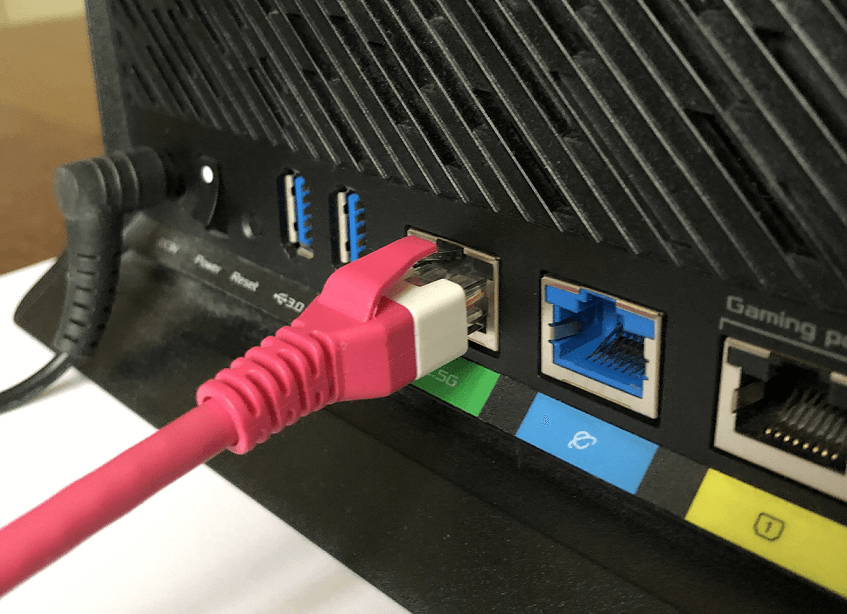
Ethernet is a wired networking technology that connects devices to local area networks (LANs) for fast, reliable data transfer. It works over copper or fibre cables to deliver high capacity, low latency connectivity. For example, if you plug your laptop into a router at home or work, you’re using Ethernet.
Ethernet cable plugged into a home router
Because it’s wired, Ethernet typically offers higher speeds, lower latency and greater security than Wi-Fi (WLAN).
How has Ethernet evolved?
Ethernet was invented in the 1970s and first standardised in 1983 with a speed of 10Mbps. Since then, it’s evolved into Carrier Ethernet, delivering up to 100Gbps or more over long distances.
Today, you’ll find Ethernet everywhere. From home LANs to large enterprise wide area networks (WANs) and metropolitan area networks (MANs), it forms the backbone of many wired networks worldwide.
How does Ethernet work?
Ethernet divides data into small chunks called frames, which are transmitted over standardised cables. Ethernet works primarily at the data link layer (Layer 2) of the OSI model, with some elements operating at the physical layer (Layer 1).
The seven layers of the OSI Model
| # | Layer | Function |
| 7 | Application layer | Enables humans or software to interact with the network through applications like file sharing, email clients and databases |
| 6 | Presentation layer | Formats, encrypts and decrypts data for the application layer |
| 5 | Session layer | Starts, maintains and ends connections between applications |
| 4 | Transport layer | Transfers data across the network, for example, using TCP or UDP transport protocols |
| 3 | Network layer | Enables communication between multiple networks and determines the data’s path, for example, applying IP addresses |
| 2 | Data link layer | Manages connections between physically connected nodes on a network |
| 1 | Physical layer | Transmits raw data bits over physical media like cables or wireless connections |
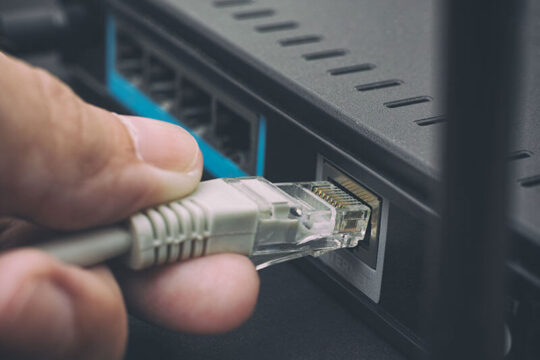
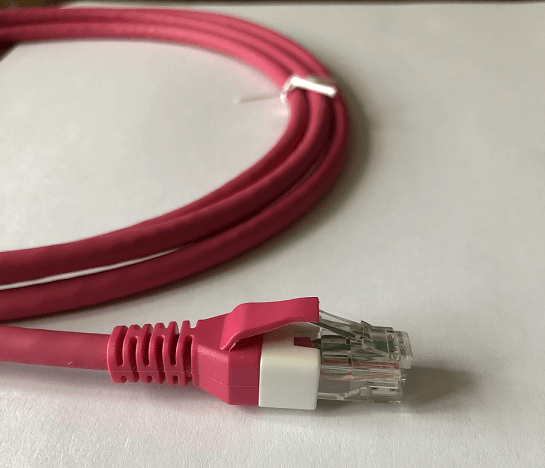
At the physical layer, Ethernet typically uses twisted-pair copper or fibre optic cables to connect devices. For example, below is a twisted-pair Ethernet cable with a standard RJ45 connector.
Ethernet cable and RJ45 connector
At the data link layer, Ethernet defines the protocols used to transmit data between connected devices as follows.
MAC addresses
Ethernet uses 48-bit Medium Access Code (MAC) addresses. MAC addresses uniquely identify devices on the network.
Ethernet frames
To transmit data, Ethernet packages data into frames containing the source and destination MAC addresses, error-checking data and other standard information. Only devices on the network with the matching destination MAC address will process the frame.
Collision handling
In traditional Ethernet, if two devices transmit data simultaneously, a collision occurs. To prevent this, devices “listen” to the network to see if it’s free. They use CSMA/CD (Carrier Sense Multiple Access with Collision Detection) – an algorithm that allows frames to be retransmitted without collisions.
Today, modern Ethernet networks use switches to forward frames to MAC addresses on the network, reducing collisions and enhancing performance.
In addition, full-duplex mode allows devices to send and receive data simultaneously, doubling the network bandwidth. The total available bandwidth of an Ethernet network depends on the standard used.
Ethernet standards
Ethernet was first standardised in 1983 as IEEE 802.3. At that time, it used thick coaxial cables to transmit data at just 10Mbps over a few hundred metres. All devices shared one channel on a single cable.
Today, Ethernet uses twisted pair or fibre optic cables with switches to forward data efficiently. Here are some key milestones in the evolution of Ethernet standards:
- Original Ethernet (10BASE): 10Mbps (early 1980s)
- Fast Ethernet (100BASE): 100Mbps (mid-1990s)
- Gigabit Ethernet (1000BASE): 1Gbps (late 1990s)
- 10 Gigabit Ethernet (10GBASE): 10Gbps (early 2000s)
- 40/100 Gigabit Ethernet (40GBASE/100GBASE): 40Gbps and 100Gbps (2010)
Common Ethernet standards
(Note: Multimode fibre optic cables divide optical wavelengths into multiple paths for different channels; single-mode fibre cables feature a single path for longer distances.)
| Ethernet standard | IEEE specification | Max speed | Max distance | Common name |
| 10BASE5 | 802.3 | 10Mbps | 500m (coaxial) | Thicknet |
| 10BASE2 | 802.3a | 10Mbps | 185m (coaxial) | Thinnet |
| 10BASE-T | 802.3i | 10Mbps | 100m (twisted pair) | 10 Megabit Ethernet |
| 100BASE-TX | 802.3u | 100Mbps | 100m (twisted pair) | Fast Ethernet |
| 100BASE-FX | 802.3u | 100Mbps | 2km (fibre optic, multimode) | Fast Ethernet |
| 1000BASE-T | 802.3ab | 1Gbps | 100m (twisted pair) | Gigabit Ethernet |
| 1000BASE-SX | 802.3z | 1Gbps | 550m (fibre optic, multimode) | Gigabit Ethernet |
| 1000BASE-LX | 802.3z | 1Gbps | 5km (fibre optic, single-mode) | Gigabit Ethernet |
| 10GBASE-T | 802.3an | 10Gbps | 100m (twisted pair) | 10 Gigabit Ethernet |
| 10GBASE-SR | 802.3ae | 10Gbps | 300m (fibre optic, multimode) | 10 Gigabit Ethernet |
| 10GBASE-LR | 802.3ae | 10Gbps | 10km (fibre optic, single-mode) | 10 Gigabit Ethernet |
| 40GBASE-T | 802.3bq | 40Gbps | 30m (twisted pair) | 40 Gigabit Ethernet |
| 40GBASE-SR4 | 802.3ba | 40Gbps | 150m (fibre optic, multimode) | 40 Gigabit Ethernet |
| 40GBASE-LR4 | 802.3ba | 40Gbps | 10km (fibre optic, single-mode) | 40 Gigabit Ethernet |
| 100GBASE-SR10 | 802.3bj | 100Gbps | 100m (fibre optic, multimode) | 100 Gigabit Ethernet |
| 100GBASE-LR4 | 802.3bj | 100Gbps | 10km (fibre optic, single-mode) | 100 Gigabit Ethernet |
The latest Ethernet standards support speeds up to 400Gbps (IEEE 802.3bs), and 800Gbps and 1 Terabit Ethernet are currently under development.
Most Ethernet-enabled devices are backwards compatible, but your network will only run at the speed of its slowest component.
Get high-bandwidth Business Ethernet
Ethernet components
Ethernet relies on standardised components that work together to enable data transfer. Here are some of the key elements of an Ethernet network:
- Network interface cards (NICs): Also known as network adapters, NICs are built into devices like servers, computers and printers and allow them to “talk” to an Ethernet network.
- Ethernet cables: Cables connect devices to the network. Twisted-pair Category 5e (Cat5e) and Category 6 (Cat6) cables are commonly used for Gigabit Ethernet; fibre optic cables are used for longer distances.
- Ethernet ports and RJ45 connectors: Ports are the physical sockets on devices that Ethernet cables plug into using a standard RJ45 connector (see image above).
- Switches: Switches connect multiple devices to a network and direct traffic to the right device, reducing data collisions and improving network efficiency.
- Hubs: A legacy component, hubs connect multiple devices to a network but broadcast data to all the devices, so they’re less efficient than switches.
- Routers: Links your LAN to other networks or the network, assigning IP addresses and managing traffic.
As components are standardised, Ethernet networks are often “plug-and-play” with little or no setup required – one of several advantages of Ethernet connectivity.
Why use Ethernet connectivity?
Ethernet is widely used in business networks because it’s fast, reliable and easy to scale. Here are the main benefits of Ethernet.
Speed
Business Ethernet services typically provide low latency and high-speed data transmission up to 100Gbps+ with symmetrical upload/download speeds. That’s ideal for large file transfers and real-time tasks like video conferencing, cloud applications or other mission-critical networks.
Cost
Ethernet components are widely available, relatively cheap, and easy to install. So you get high capacity connectivity at a relatively low cost.
Scalability
It’s easy to scale up Ethernet bandwidth as your network grows. And you can usually add devices by cables and switches with minimal setup.
Reliability
Ethernet is a dedicated, wired connection that is less susceptible to interference or disruption than wireless connections. In addition, business Ethernet services typically offer SLAs that guarantee network uptime.
Resilience
Ethernet offers resilience and diversity options to keep you connected if part of the network fails. Options include RO2, dual-homing and shadow VLANs, which provide added protection for mission-critical services.
Learn more about Ethernet resilience
Security
Compared to wireless LANs (WLAN), Ethernet networks are less vulnerable to unauthorised access. Physical ports are easier to secure than Wi-Fi access points.
Interoperability
Ethernet is a global standard, so almost all computers, printers and network storage devices support it. That means easy compatibility across vendors.
So Ethernet is fast, reliable and easy to scale, but it costs more than a simple business broadband connection. How do they differ?
Business Ethernet vs business broadband
Ethernet is fundamentally a Layer 2 technology that connects devices or sites over a dedicated, leased line. It can link a single business site or multiple sites and also provide internet access: it’s the foundation for Dedicated Internet Access.
In contrast, business broadband is a Layer 3 service. It’s simply an IP-based internet connection delivered over shared, mass-market infrastructure.
Here’s how business Ethernet and business broadband compare:
| Feature | Business Ethernet (leased line) | Business broadband |
| Connection type | Dedicated, point-to-point, point-to-multipoint or any-to-any link exclusively for your business site(s) | Internet connection shared with other users in the area |
| Bandwidth | Guaranteed, uncontended bandwidth | Bandwidth varies depending on local network traffic |
| Speed | Symmetrical upload/download speeds up to 100Gbps | Asymmetrical speeds, typically up to 1Gbps |
| Reliability | High reliability with enterprise uptime SLAs | Lower reliability, “best effort” service |
| Scalability | Easy to upgrade as your organisation grows | Limited by local network capacity |
| Latency | Consistently low | Can fluctuate depending on network load |
| Installation | Longer install times – engineer build required | Quick install over existing broadband infrastructure |
| Cost | Higher monthly cost as it’s a dedicated service | Lower cost |
Ethernet over FTTP/FTTC
If you want some of the benefits of Ethernet but at a lower bandwidth and cost, you can connect your business with Ethernet over FTTP or FTTC (EoFTTx).
FTTP (Fibre to the Premises) uses pure fibre from the exchange to your site for higher speeds. FTTC (Fibre to the Cabinet) combines fibre to your local street cabinet with copper to your premises for a lower-cost option.
Neos Networks EoFTTx offers bandwidths from 80Mbps to 1Gbps – ideal for smaller organisations that need reliable connectivity at a lower price. For larger organisations, our EoFTTX NNI enables you to take an NNI at your chosen data centre and run any Ethernet services over it.
Business Ethernet use cases
Given Ethernet’s speed, reliability and wide availability, it’s commonly used by organisations that need consistent, high capacity connectivity for critical operations.
Typical use cases include:
- Multisite networking: secure links between offices (WANs), data centres (DCIs) and remote locations.
- Video conferencing and collaboration: enabling smooth, real-time communication without delays.
- Cloud and SaaS: providing dependable access to hosted applications and services.
- E-commerce and ERP systems: maintaining accurate, up-to-date data for transactions and inventory.
- Data-heavy workloads: supporting AI, IoT and analytics that demand high capacity.
- Real-time operations: enabling financial trading, media streaming and healthcare systems.
Ethernet services can be as simple as a point-to-point connection or as flexible as an any-to-any network, depending on your use case. Let’s look at the main service types.
Types of business Ethernet services
Various Carrier Ethernet services provide high-bandwidth data transmission for enterprise applications. Below are the main types of Carrier Ethernet services, as defined by Mplify:
Carrier Ethernet services
| Service type | Topology | Description |
| E-Line (Ethernet Line Service) | Point-to-point or point-to-multipoint | Directly connects two business sites |
| E-LAN (Ethernet LAN Service) | Multipoint-to-multipoint | Allows multiple sites to exchange data directly with each other |
| E-Tree (Ethernet Tree Service) | Rooted multipoint | Connects a central site to multiple sites, but the “leaves” (branch nodes) of the tree don’t exchange data directly |
| E-Access (Ethernet Access Service) | Network-to-network | Provides a local access connection to another carrier’s network |
Good network service providers typically offer various business Ethernet services based on these standards.
Get high-bandwidth Business Ethernet
Choosing a business Ethernet service
Which service is right for your business depends on your specific needs. At Neos Networks, we offer a range of business Ethernet services you can scale up to 100Gbps. Here are some services we can configure for your business.
Point-to-NNI
If you’re a larger customer and want to connect multiple premises back to your network, an Ethernet network-to-network interface (NNI) could be ideal. With point-to-NNI connectivity, you can connect your sites as efficiently as possible at bandwidths you can scale.
Ethernet point-to-NNI

Point-to-point Ethernet
If you need a high-bandwidth, low latency connection between two locations, Ethernet Private Line (EPL) is a good choice. A kind of E-Line service, EPL provides Ethernet point-to-point (P2P) connectivity between a pair of dedicated user network interfaces (UNIs).
EPL point-to-point Ethernet

Point-to-multipoint Ethernet
If you want to connect multiple sites, Ethernet Virtual Private Line (EVPL) may be for you. EVPL is a type of E-Line service that supports point-to-multipoint (P2MP) connectivity by enabling multiple Ethernet Virtual Connections (EVCs) per UNI.
EVPL point-to-multipoint Ethernet

Any-to-any Ethernet
If you need flexibility to link any of your premises to any other, Virtual Private LAN Service (VPLS) could be ideal. VPLS connects multiple sites in a single domain through IP routing or MPLS.
VPLS any-to-any Ethernet

Overall, which Ethernet service is right for your business depends on your specific use case, budget, and plans for future growth. If you’d like to discuss which is best for your business, get in touch. We’ll be happy to make Ethernet work for you.
Get high-bandwidth Business Ethernet
Ethernet FAQs
-
How fast is Ethernet today?
The latest Ethernet standards support speeds from 10Mbps up to 400Gbps, with 800Gbps and 1Tbps under development. Most business services scale between 100Mbps and 100Gbps, depending on your network design and hardware. Your network will only run at the speed of its slowest component.
-
Does Ethernet support symmetrical upload and download speeds?
Yes. Ethernet is a synchronous technology, so upload and download bandwidths are identical. That’s a key advantage over business broadband, which usually offers faster downloads than uploads. Symmetrical bandwidth makes Ethernet ideal for real-time applications like video conferencing and cloud services.
-
How secure is an Ethernet network?
Ethernet is inherently more secure than wireless because it’s a physical, wired connection. Access requires plugging into a port, which makes unauthorised entry harder than over Wi-Fi. Business Ethernet adds further protection with private circuits and optional encryption for sensitive data.
-
Is Ethernet suitable for multisite businesses?
Yes. Ethernet is designed to connect multiple sites securely and efficiently. Services like E-Line, E-LAN and VPLS allow point-to-point, point-to-multipoint or any-to-any connectivity, making it ideal for data centre interconnects and enterprise wide area networks (WAN), including SD-WAN.
-
Can Ethernet support cloud and SaaS applications?
Yes. Ethernet gives you high bandwidth, low latency and reliability for fast, stable access to cloud platforms and SaaS tools. Its symmetrical upload and download bandwidth is perfect for real-time apps and large file transfers.
-
What resilience options are available for Ethernet?
Business Ethernet services include resilience features to keep you connected if part of the network fails. Options include dual-homing, diverse routing and RO2 (Resilience Option 2), which uses separate paths for added protection. Some providers also offer shadow VLANs and MPLS fast re-route for rapid failover.
-
How does EPL differ from EVPL and VPLS?
EPL (Ethernet Private Line) gives you a dedicated point-to-point link between two sites. EVPL (Ethernet Virtual Private Line) also uses E-Line but supports multiple virtual connections from one site to others.
VPLS (Virtual Private LAN Service) is different: it creates an any-to-any Ethernet network so all your sites can communicate directly.
-
How does Ethernet pricing compare to other connectivity options?
Ethernet is generally more cost-effective than other high capacity, dedicated connectivity option. It scales easily from low to very high bandwidths without changing the underlying technology. While it costs more than business broadband, Ethernet offers far higher reliability, symmetrical speeds and guaranteed performance, making it a better long-term choice for mission-critical applications.
-
How quickly can Ethernet be installed?
Installation times vary by service type and location. Standard Business Ethernet can take several weeks because it needs a dedicated build. Ethernet over FTTP or FTTC uses existing fibre infrastructure, so it’s much faster – often delivered in half the time.